
Your Form 1099-DA showed up with a proceeds figure, maybe a cost basis, and an implicit assumption that you'll simply copy those numbers onto your return. Don't make that assumption. This is the first filing season brokers have ever produced this form, and the IRS itself has built in good-faith transition relief for exactly the kind of mistakes a brand-new reporting format tends to produce. If you're one of the many filers who requested an extension, you have until October 15, 2026 to reconcile your Form 1099-DA against your own transaction history before you file. That's not a lot of time to waste trusting a number you haven't checked.
This guide assumes you already have a Form 1099-DA in hand and know roughly what it is. If you need the background first, our guide to Form 1099-DA covers what the form reports, the 2025-to-2027 rollout timeline, and why some statements arrived late this season. What follows here is narrower and more immediate: the specific errors to check for, a step-by-step reconciliation process, and what to do once you find a mistake.
Key Takeaways
- Broker good-faith relief for this first filing season means the IRS expects Form 1099-DA reporting mistakes, not fewer of them, so the number in your inbox deserves a second look before you file.
- Missing cost basis is normal, not necessarily an error, since 2025 tax year forms only require gross proceeds and most crypto held before 2026 counts as a noncovered security anyway.
- Five checks catch most reconciliation problems, from missing basis on noncovered assets and covered-versus-noncovered misclassification to proceeds booked to the wrong tax year, duplicate or missing transactions, and wallet transfers mistaken for disposals.
- A wrong 1099-DA doesn't excuse a wrong tax return, so request a corrected form from the broker where possible and report your own accurate figures through the Form 8949 correction columns either way.
- The extended filing deadline is October 15, 2026, which leaves a real window to reconcile your own records against the form if you start now.
Why You Can't Just Trust the Number on Your Form 1099-DA
Form 1099-DA is a brand-new information return. Brokers built the systems that generate it from scratch over the past year, mapping their own internal trade data into a reporting format the IRS finalized only recently. First-year information returns for a new asset class are where errors tend to cluster, and the IRS's own conduct this season backs that up.
Under its transitional guidance, the IRS will not impose penalties on brokers who fail to correctly file or furnish 2025 tax year Form 1099-DA statements, provided the broker made a good-faith effort to get it right. That relief exists precisely because the agency anticipated brokers would need room to work through a new reporting regime without an automatic penalty for early mistakes. It says nothing about whether any individual form is accurate. It only says the broker won't be fined for getting it wrong in good faith, and that distinction matters enormously for you as the filer.
Good-faith relief for the broker is not relief for you. A Form 1099-DA showing the wrong figure doesn't change what belongs on your own return, and later in this guide you'll see exactly how the IRS's own Form 8949 instructions handle that gap. Tax professionals and crypto tax software providers have warned about reconciliation issues on this first round of forms, including incorrect proceeds amounts and duplicated transaction entries. None of that is a reason to panic. It's a reason to check the form against your own records before you file, which is exactly what the rest of this guide walks through.
Five Reconciliation Errors to Check For
Most Form 1099-DA problems fall into one of five categories. Work through each one against your own transaction history rather than assuming the form already got it right.
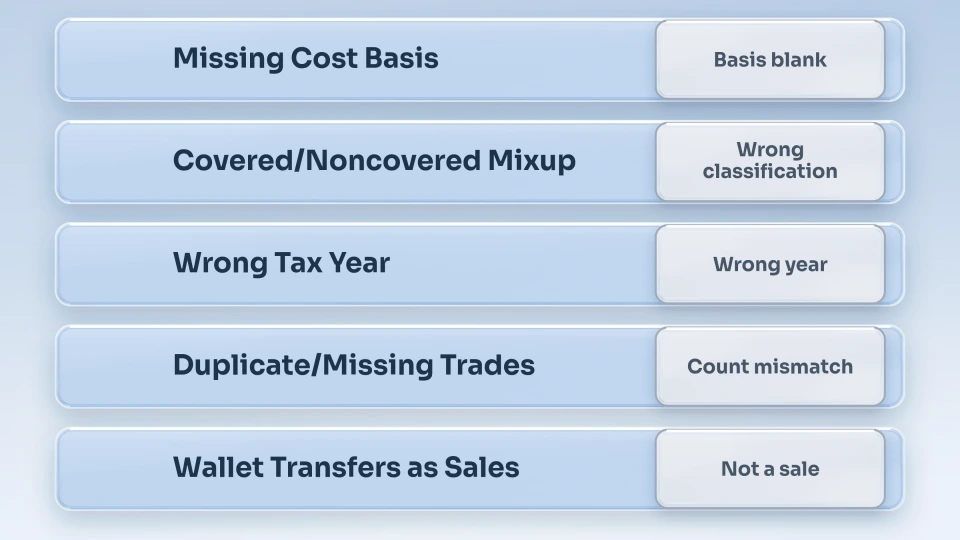
- Missing cost basis for pre-2026 transfers or noncovered securities. Under the Form 1099-DA instructions, a digital asset only counts as a covered security if you acquired it on or after January 1, 2026 through a broker that held it in custody continuously until the disposal. Everything else, including anything you bought before 2026 or transferred in from another wallet or exchange, is noncovered, and basis reporting for noncovered assets is voluntary. An empty basis box on this year's form is standard, not a mistake, but it still leaves the calculation to you.
- Broker misclassification of covered versus noncovered securities. The covered-security chain breaks the moment an asset moves to a different custodial account, and some brokers' systems have flagged transferred-in assets as covered when they should have been noncovered, or the reverse. Compare the classification on your form against your own transfer history for each asset, especially anything you moved between exchanges during the year.
- Proceeds attributed to the wrong tax year. A sale executed in the final days of December or the first days of January is exactly where a broker's trade-date logic can slip, attributing a disposal to 2025 when it actually settled in 2026, or the other way around. Check the transaction date on the form against your own exchange records for any trade near a year-end boundary.
- Duplicated or missing transactions. A single trade sometimes generates two entries on a broker's back end, for example when an order fills in multiple partial executions, and one of those legs can end up double-counted on the form. The opposite problem, a transaction that never made it onto the form at all, is just as common and just as easy to miss if you're only skimming the total.
- Transfers between your own wallets mistakenly treated as disposals. Moving crypto from an exchange to your own hardware wallet, or between two accounts you control, isn't a taxable event. Some broker systems still flag an outbound transfer as a disposal by default unless you've specifically tagged the receiving address as your own, which can inflate your reported proceeds for activity that was never a sale in the first place.
Reconcile your 1099-DA against your real transaction history
CoinTracking imports your transaction history from over 400 exchanges, wallets, and blockchains, matching every disposal against your own records so a broker's misclassification doesn't become your tax return's mistake.
Your Step-by-Step Reconciliation Checklist Before October 15
Reconciling a Form 1099-DA is a mechanical process. Work through it in order rather than spot-checking a few transactions and calling it done.
- Pull your complete transaction history for every exchange and wallet you used during the tax year, not just the broker that sent you a 1099-DA. Activity on platforms that don't issue the form is still taxable and still belongs in your own records.
- Match every disposal on the form to a transaction in your own records, one line at a time. Flag anything on the form you can't independently verify, and flag anything in your own records that's missing from the form.
- Check each covered-security flag against your actual acquisition and custody history. If an asset moved between accounts at any point, confirm the form treats it as noncovered rather than covered.
- Verify transaction dates against year-end boundaries. Anything from mid-December through early January deserves a second look for proceeds booked to the wrong tax year.
- Confirm that wallet-to-wallet transfers between your own accounts aren't showing up as disposals. If your total proceeds look higher than the sales you actually made, this is the first place to check.
- Calculate your own cost basis for every noncovered security using your original purchase records, since the form generally won't do this for you this season.
- Total your figures independently and compare them to the form's totals. A material mismatch, in either direction, means something above needs a closer look before you file.
None of this requires specialized software, but it does require complete records across every platform you've used, and reconstructing that by hand across several exchanges gets tedious fast. Crypto tax software that imports directly from your exchanges and wallets turns this checklist into a few minutes of review instead of a spreadsheet project.
What to Do If You Find an Error
Once you've identified a genuine mismatch, the IRS has a specific process for it. Its own guidance, Understanding your Form 1099-DA, includes a section addressing exactly this situation, titled "If your Form 1099-DA has incorrect information." The instructions are direct: request a corrected form from the issuer, whose name and contact information appear in the "Filer" box in the top left corner of the form, and keep a copy of the corrected form along with any correspondence with the issuer. The IRS is explicit on one point in particular: don't contact the IRS about it, since the agency can't correct your Form 1099-DA for you.
The same guidance is equally direct on timing: don't wait to file your taxes while a correction is pending. If a corrected form arrives before October 15, report the corrected figures. If it doesn't arrive in time, or the broker won't issue one at all, you're not stuck reporting a number you know is wrong.
The Form 8949 instructions cover this exact scenario by name, and which correction method applies depends on whether the basis was reported to the IRS. If your 1099-DA shows the basis was reported to the IRS, which is usually the case for a covered security in box A/G or D/J, enter the broker's basis in column (e) anyway, then use adjustment code B in column (f) and the correction in column (g).
If the basis was not reported to the IRS, which is usually the case for a noncovered security in box B/H or E/K, skip the broker's figure entirely: enter your correct basis directly in column (e) and leave column (g) at -0-. Either way, you're using a method the IRS built for precisely this situation.
This applies to proceeds as much as to basis, though the mechanics differ. If you've confirmed a duplicate transaction, a disposal booked to the wrong tax year, or a wallet transfer wrongly flagged as a sale, enter the proceeds as shown on the form in column (d) of Form 8949, then make the correction in column (g) with the applicable adjustment code, explain it, and keep your documentation. Schedule D should then reflect the correct final gain or loss. Our full walkthrough of reporting crypto earnings covers how that flows through to Schedule D and Form 1040 in more detail.
Don't file a broker's mistake as your own
CoinTracking calculates cost basis, holding period, and gain or loss automatically from your imported transaction history, so your Form 8949 reflects your actual records instead of an uncorrected Form 1099-DA.
When It's Not an Error, It's Missing Cost Basis
Sometimes the reconciliation process turns up something bigger than a broker mistake: you genuinely don't have the records to establish your cost basis for a given asset. That's a different problem than the ones above, and it's common enough with older holdings, coins moved through exchanges that have since shut down, or transfers where the original purchase confirmation was never saved.
If that's where you've landed, treating it as a 1099-DA error and requesting a correction won't help, because the broker never had the missing information to report in the first place. Our guide on how to reconstruct missing cost basis walks through the specific steps for rebuilding that number from partial exchange records, blockchain history, and other supporting documentation, which is the right next move once you've confirmed the gap is real rather than a reporting mistake.
Conclusion
An extension buys you time, not a free pass to file whatever number arrives in your inbox. Treat the form as a starting point to verify against your own records, not a final answer, and let the reconciliation work happen on your schedule rather than the night before it's due.
File your 1099-DA correctly, not just on time
CoinTracking has tracked crypto portfolios and calculated taxes for over 2.2 million users since 2012, across more than 400 exchanges, wallets, and blockchains, reconciling exactly the kind of first-year Form 1099-DA gaps this guide covers.
Disclaimer
The information provided in this article is intended for general informational purposes only and should not be construed as financial, tax, or legal advice. Form 1099-DA reporting requirements and IRS correction procedures are subject to further guidance and change. Readers are encouraged to conduct their own research and consult with a qualified tax professional about their specific situation before making decisions based on the information presented here. The author and publisher are not responsible for any losses or damages incurred as a result of using the information in this article.