Mercatox Taxes: How to Import Your Historical Data & Generate Your Tax Report
Mercatox was a UK-based crypto exchange that has since closed. But closure does not erase your tax obligations — every trade you made on the platform remains a taxable event. CoinTracking accepts your Mercatox CSV export, calculates gains and losses across your full trading history, and generates a tax report ready for your accountant or tax authority.

How to Import Your Mercatox Transactions into CoinTracking
Watch how to upload your Mercatox CSV export into CoinTracking and generate your complete crypto tax report — even for historical data from a closed exchange.
Start Your Free Mercatox Import- Every crypto trade, swap, and disposal on Mercatox is a taxable event in most jurisdictions. Capital gains tax and income tax may both apply — regardless of whether the exchange is still operating.
- CoinTracking imports Mercatox transactions via CSV export (manual upload). Download your transaction history from Mercatox E-Wallet → Transaction History → Download CSV and upload it to CoinTracking.
- Transferring crypto between your own wallets or accounts is not a taxable event. Buying and holding crypto is not taxable until disposal.
- Mercatox has been closed. You can still import historical data via CSV. Your tax obligations for trades made on Mercatox remain in effect — all gains, losses, and income must be declared for the relevant tax years. CoinTracking supports CSV import for historical Mercatox data.
Mercatox and Your Crypto Tax Obligations
Mercatox was a UK-based cryptocurrency exchange that allowed users to trade a wide range of digital assets, including many smaller-cap altcoins and tokens. The exchange operated under UK jurisdiction and, following Brexit, was outside the scope of EU regulations. Mercatox ceased operations around 2022–2023, leaving users unable to withdraw funds or access the platform.
As a UK-based exchange operating outside the EU, Mercatox was not subject to EU DAC8 reporting requirements. However, as a UK business, it was subject to HMRC reporting obligations and may have shared certain account data with relevant authorities. You remain personally responsible for declaring all taxable events from your Mercatox trading history.
CoinTracking supports Mercatox via CSV import:
- Mercatox CSV: export your transaction history from E-Wallet → Transaction History → Download CSV and upload it directly to CoinTracking
- All spot trades, deposits, and withdrawals are supported
- Historical data from closed exchanges is fully compatible with CoinTracking\'s tax engine
- Generate back-tax reports for prior years if you have not yet declared your Mercatox activity

Crypto Tax Basics: What Mercatox Users Need to Know
Mercatox served traders across the UK and internationally. The core tax principles below apply broadly — but always verify the specifics with your local tax authority or a qualified tax advisor.
Every disposal is a taxable event
In most countries, selling, swapping, or otherwise disposing of cryptocurrency triggers capital gains tax. The gain or loss equals the difference between your proceeds and your cost basis (what you originally paid, including fees). This applies to each individual trade made on Mercatox — even historical ones from previous tax years.
Obligations survive exchange closure
The closure of Mercatox does not eliminate your tax obligations for trades made while the exchange was active. HMRC and other tax authorities can assess back-taxes for unreported gains, often going back several years. If you have not yet declared your Mercatox trading history, you should file retroactively using your historical CSV data. CoinTracking can generate tax reports for any prior year from your imported data.
Record-keeping with CSV exports
Since Mercatox is no longer operational, your CSV export file is the primary record of your trading history. Each transaction should be documented with the date, asset, quantity, cost basis, proceeds, and fees. Importing this data into CoinTracking converts it into a structured tax report with a full audit trail, formatted for your jurisdiction.
Mercatox Taxes by Country
Mercatox served traders worldwide, including a large UK user base. Crypto tax rules differ by market — below are the key rates, deadlines and filing rules for the countries where CoinTracking users most commonly report their Mercatox history.
 United Kingdom
- Capital Gains Tax: 18% (basic rate) or 24% (higher rate) from October 2024
- Annual exempt amount: £3,000 (2024/25 onward)
- Cost basis: Section 104 pool (HMRC rules) — all tokens of the same type are pooled
- Authority: HMRC
- Forms: Self Assessment SA100, SA108
- Back-filing: HMRC can assess unpaid tax up to 20 years back for non-disclosure; file retroactively if needed
 Germany
- Disposal tax: Personal income tax rate (up to 45%); gains are tax-free if held longer than 1 year (Haltefrist)
- Annual exemption: Gains up to €1,000/year are tax-free
- Business income: If trading is a business activity, profits are taxed as Gewerbeeinkünfte (trade income)
- Cost basis: FIFO per wallet
- Authority: Finanzamt
- Forms: Anlage SO, Anlage KAP
 Austria
- 27.5% capital gains tax: Since March 2022, crypto is taxed like shares — a flat 27.5% KESt applies to gains.
- Old coins grandfathered: Crypto acquired before 28 February 2021 is tax-free on disposal.
- Business income: Professional trading activity may be taxed as business income at progressive rates.
- Authority: Finanzamt Austria. Report via Einkommensteuererklärung (E1 / E1kv).
 Switzerland
- Capital gains: Generally tax-free for private investors; professional traders are taxed as self-employed income
- Wealth tax: Crypto holdings subject to wealth tax at cantonal rates based on year-end market value
- Business trading: High-frequency or leveraged trading may be classified as professional activity and taxed accordingly
- Authority: Cantonal tax authority (varies by canton)
 Spain
Spain
- Savings income (IRPF): 19% up to €6,000; 21% up to €50,000; 23% up to €200,000; 27% up to €300,000; 28% above
- Foreign crypto disclosure: Modelo 721 required if portfolio exceeds €50,000 abroad
- Business activity: Classified as rendimientos de actividades económicas if trading is a professional activity
- Authority: Agencia Tributaria (AEAT)
- Forms: Modelo 100 (IRPF), Modelo 721
 Poland
- Flat rate: 19% on all crypto gains (no holding period exemption)
- Loss carryforward: Up to 5 years
- Business income: Professional crypto trading may be taxed under business income rules
- Cost basis: FIFO
- Authority: Urząd Skarbowy
- Form: PIT-38
 Italy
Italy
- Flat rate: 26% on gains exceeding €2,000/year (from 2023)
- Foreign holdings disclosure: Quadro RW required if portfolio exceeds €15,000
- Business income: Corporate and professional traders taxed under IRES/IRPEF rules
- Authority: Agenzia delle Entrate
- Forms: Quadro RT (gains), Quadro RW (foreign holdings)
 Portugal
- Disposal tax: 28% on gains from crypto held less than 1 year (from 2023)
- Long-term holding: Tax-free on disposal if held 1 year or longer
- Authority: Autoridade Tributária (AT)
- Forms: Modelo 3, Anexo G or Anexo J
 France
- Flat 30% tax (PFU): Gains from crypto disposals are subject to the prélèvement forfaitaire unique (PFU) — 12.8% income tax + 17.2% social charges.
- No exemption for holding period: Unlike Germany, there is no tax-free threshold after 1 year.
- Professional traders: High-frequency trading may be classified as BNC (non-commercial income) at progressive rates.
- Authority: Direction générale des Finances publiques (DGFiP). Declare via Formulaire 2086.
Tax rules change frequently. This overview is for general information only and does not constitute tax advice. Consult a qualified advisor for your specific situation.
Are Mercatox Transactions Taxable?
In most jurisdictions, crypto is treated as an asset: disposing of it triggers capital gains tax. These rules apply to your historical Mercatox trading data — even after the exchange has closed. Use this as a starting reference — exact rules vary by country.
Taxable Events
- Selling crypto for fiat (GBP, EUR, USD, etc.)
- Swapping or trading crypto for crypto
- Using crypto to pay for goods or services
- Referral rewards and trading bonuses received
Not Taxable
- Buying and holding crypto
- Transferring crypto between your own accounts
- Depositing fiat to Mercatox
- Receiving crypto as a personal gift
Tax treatment varies by country. CoinTracking applies the rules for your selected jurisdiction automatically.
How to Calculate Your Mercatox Taxes
Even if Mercatox has closed, you still need to account for every trade you made on the platform. Calculating cost basis, holding periods, and gains for each individual transaction — potentially spanning multiple years — is impractical without automation.
CoinTracking imports your complete Mercatox trade history via CSV, applies your chosen cost-basis method (FIFO, LIFO, HIFO, Section 104, and others), calculates gains and losses for every disposal, and produces a jurisdiction-specific tax report. Historical data from prior tax years is fully supported — you can generate back-tax reports for any year covered by your Mercatox CSV file.
The result is a tax report — PDF or Excel — that your accountant or tax authority will accept, with a full audit trail for every transaction.
How to Import Mercatox into CoinTracking
Three steps to upload your Mercatox CSV and generate your tax report.
- 1
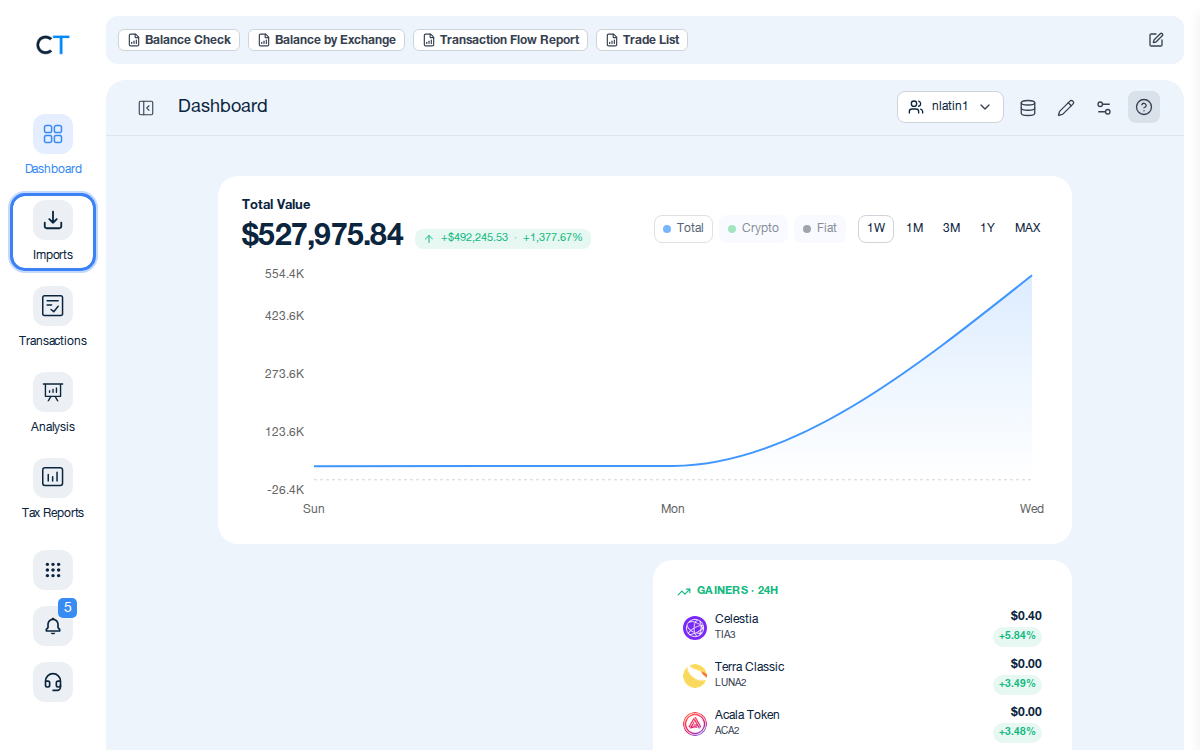
Log into CoinTracking and open Imports
After logging in, click the Import icon in the left navigation. This is where you connect all your exchanges, wallets and blockchains.
- 2
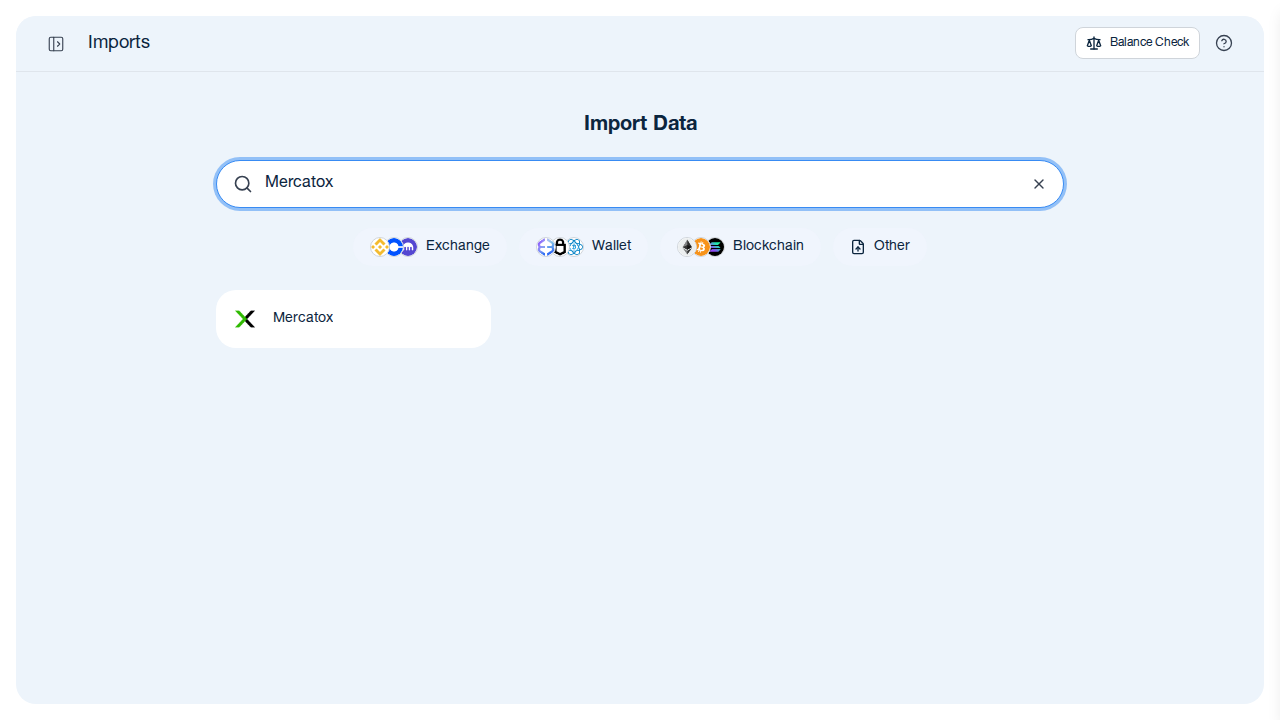
Search for Mercatox in the import list
Type "Mercatox" in the search field. CoinTracking will show the Mercatox import option — select it to proceed with your CSV upload.
- 3
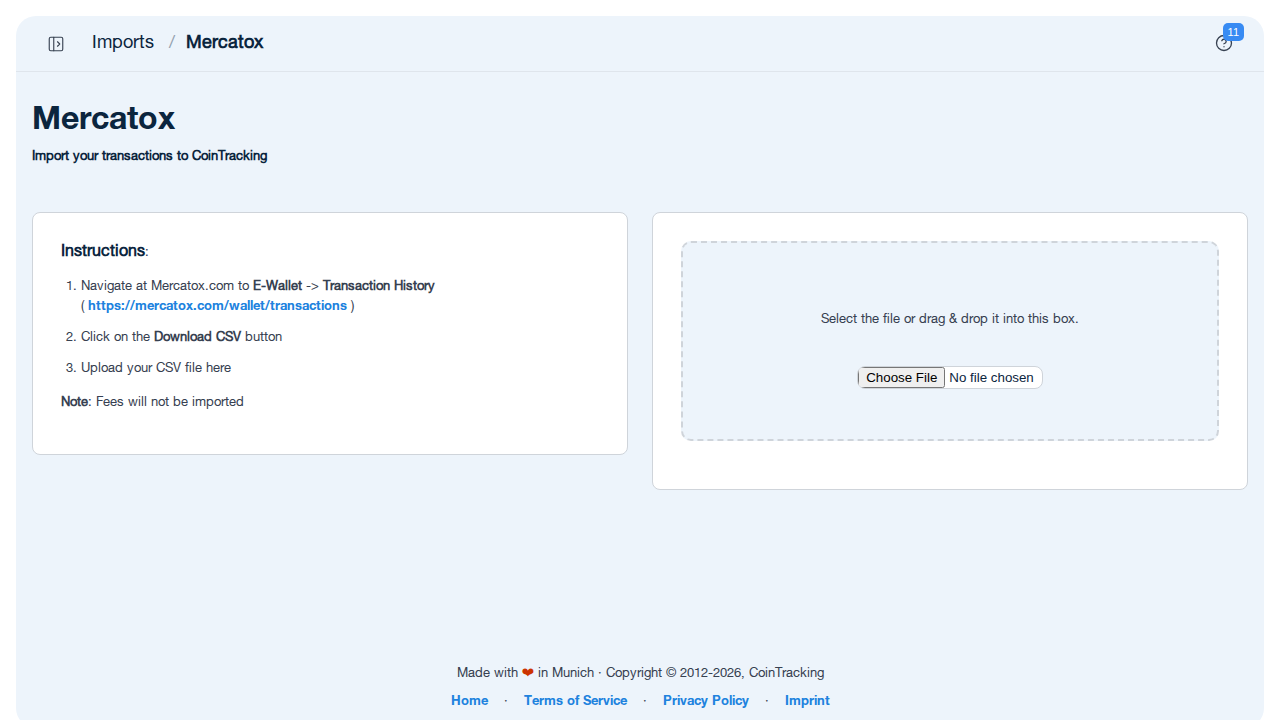
Upload your Mercatox CSV export
Download your transaction history from Mercatox E-Wallet → Transaction History → Download CSV, then upload the file to CoinTracking. All trades, deposits, and withdrawals will be imported automatically.
"CoinTracking can handle just about any complex transaction you can throw at it and the automation is a real lifesaver. Of all the tax software tools we've reviewed, CoinTracking is the most detail-oriented and has more accuracy checks in place than the competition."

How to Create Your Mercatox
Tax Report with CoinTracking
Three steps from CSV upload to a tax report your accountant will accept.

Upload your Mercatox CSV
Download your Mercatox transaction history from E-Wallet → Transaction History → Download CSV and upload it to CoinTracking via the Mercatox import. CoinTracking imports all historical trades, deposits, and withdrawals automatically.

Review your transactions
Open Reports → Validate Transactions. CoinTracking flags missing cost basis entries, duplicate imports and price gaps so your final report is accurate — essential for historical data from closed exchanges.

Generate and export your tax report
Select your country and tax year. CoinTracking generates a report formatted for your jurisdiction: PDF or Excel, ready to file or hand to your accountant.



No. Mercatox was a UK-based crypto exchange that has since ceased operations. It did not generate a ready-to-file tax report. If you still have your Mercatox CSV export (downloaded from E-Wallet → Transaction History), you can import it into CoinTracking. CoinTracking then calculates gains, losses, and income across your full trading history and generates a compliant tax report for your jurisdiction.
You can still import your historical Mercatox trading data into CoinTracking using a CSV file. If you exported your transaction history from Mercatox before it closed, navigate to CoinTracking → Import Data → search for "Mercatox" and upload your CSV file. CoinTracking will parse all your historical trades, deposits, and withdrawals automatically. If you no longer have the CSV file, recovery options may be limited given the exchange's closure.
Yes. Every sale, swap, or disposal of cryptocurrency through your Mercatox account is a taxable event in most jurisdictions. Capital gains tax applies to the difference between your cost basis and the proceeds at the time of each trade. Income received — such as referral rewards — is also typically taxable. These obligations apply even now that Mercatox has closed: the historical transactions you made on the platform must still be declared for the relevant tax years.
Yes. The closure of Mercatox does not change your tax obligations for trades executed while the exchange was active. HMRC and tax authorities in other jurisdictions require you to report all crypto disposals for the relevant tax years, regardless of whether the exchange still operates. If you have not yet declared your Mercatox trading history, you should do so retroactively — CoinTracking can process historical CSV data to generate back-tax reports for past years.
Mercatox was a UK-based company. As a UK business it was subject to HMRC reporting obligations and may have shared certain account data with relevant authorities. Post-Brexit, Mercatox was not subject to EU DAC8 reporting requirements. Regardless of any exchange-level reporting, you remain personally responsible for declaring your crypto gains, losses, and income from your Mercatox activity in your annual tax return.
The correct cost-basis method depends on your jurisdiction. For UK users, HMRC mandates the Section 104 pooling rule — all tokens of the same type are pooled and an average cost basis is calculated. German users must apply FIFO per wallet. In Austria a flat 27.5% KESt applies, while Swiss private investors are generally exempt from capital gains tax. CoinTracking supports FIFO, LIFO, HIFO, Section 104, and other methods — you can switch between them and instantly recalculate your Mercatox tax report.
Start Tracking Your Crypto Taxes Today
Experience why 2.2 million users trust CoinTracking — sign up today for a seven-day free trial!