Bitpanda Taxes: How to Generate Your Crypto Tax Report
Bitpanda does not create a tax report for you. Every crypto trade and disposal is a potential tax event you are responsible for declaring. CoinTracking imports your full Bitpanda transaction history via CSV export, calculates gains and losses, and generates a tax report ready for your tax authority or accountant.

How to Import Your Bitpanda Transactions into CoinTracking
Watch how to export your transaction history from Bitpanda as a CSV file and import it into CoinTracking to generate your crypto tax report.
Start Your Free Bitpanda Import- Every crypto trade on Bitpanda is a taxable disposal in most jurisdictions. Capital gains tax applies when you sell, swap or spend crypto.
- Export your transaction history from your Bitpanda account as a CSV file and upload it to CoinTracking to generate your complete tax report.
- Transfers between your own wallets are not taxable events. Buying and holding crypto is not a taxable event.
- Under DAC8, EU brokers and crypto platforms including Bitpanda are required to report user transaction data to national tax authorities from 2026. Your trading history is increasingly visible to tax authorities.
Bitpanda and Your Tax Obligations
Bitpanda is an Austrian crypto and investment platform founded in 2014, regulated by the FMA (Austrian Financial Market Authority) and operating across Europe under EU financial regulations including MiCA. It is one of Europe's largest and most regulated crypto platforms, offering trading in cryptocurrencies, stocks, ETFs, and precious metals.
Bitpanda does not generate a tax report for users. Your transaction history must be exported as a CSV file and uploaded to CoinTracking.
CoinTracking supports Bitpanda via CSV file upload:
- Bitpanda Transaction History CSV: downloaded from your Bitpanda account settings
- All crypto buy, sell, and swap transactions are supported
- CoinTracking maps Bitpanda CSV columns automatically
- Gains, losses, and holding periods are calculated for your jurisdiction

Crypto Tax Basics: What Bitpanda Users Need to Know
Tax rules for crypto vary across jurisdictions. These three principles apply broadly to Bitpanda users, but always verify the specifics with your local tax authority or a qualified advisor.
Trading crypto is a taxable disposal
In most countries, every sale, swap or use of crypto is a taxable event. Capital gains tax applies to the difference between what you paid (cost basis) and what you received. Transfers between your own wallets do not trigger tax.
Bitpanda is a regulated EU platform — DAC8 applies
As an FMA-regulated Austrian platform operating under EU MiCA regulations, Bitpanda qualifies as a Crypto Asset Service Provider (CASP) under EU law. From 2026, it will be required under the DAC8 directive to automatically report transaction data to national tax authorities. If you have traded on Bitpanda and have not declared all gains, you face increasing risk of tax authority scrutiny.
Records are your responsibility
Bitpanda does not issue formal tax documents. The CSV export is a raw transaction history — not a tax report. Accurate records of every trade, date, cost and proceeds remain your responsibility. CoinTracking maintains a complete, dated audit trail of every Bitpanda transaction you import.
Bitpanda Taxes by Country
Crypto tax rules differ by market. Below are the key rates, deadlines and filing forms for the countries where CoinTracking users trade most actively on Bitpanda.
 Germany
- Disposal tax: Personal income tax rate (up to 45%); gains are tax-free if held longer than 1 year (Haltefrist)
- Annual exemption: Gains up to €1,000/year are tax-free
- Staking income: Taxed as other income (Sonstige Einkünfte)
- Cost basis: FIFO per wallet
- Authority: Finanzamt
- Forms: Anlage SO, Anlage KAP
 Austria
- 27.5% capital gains tax: Since March 2022, crypto is taxed like shares — a flat 27.5% KESt applies to gains.
- Old coins grandfathered: Crypto acquired before 28 February 2021 is tax-free on disposal.
- Staking and lending: Treated as capital income, also taxed at 27.5%.
- Authority: Finanzamt Austria. Report via Einkommensteuererklärung (E1 / E1kv).
 Switzerland
- Capital gains: Generally tax-free for private investors (no capital gains tax on crypto disposals for non-professionals)
- Wealth tax: Crypto holdings are subject to wealth tax at cantonal rates based on year-end market value
- Income from crypto: Mining and staking rewards are taxed as income at progressive rates
- Authority: Cantonal tax authority (varies by canton)
 United Kingdom
- Capital Gains Tax: 18% (basic rate) or 24% (higher rate) from October 2024
- Annual exempt amount: £3,000 (2024/25 onward)
- Staking income: Income Tax at marginal rate
- Cost basis: Section 104 pool (HMRC rules)
- Authority: HMRC
- Forms: Self Assessment SA100, SA108
 Spain
Spain
- Savings income (IRPF): 19% up to €6,000; 21% up to €50,000; 23% up to €200,000; 27% up to €300,000; 28% above
- Foreign crypto disclosure: Modelo 721 required if portfolio exceeds €50,000 abroad
- Staking income: Taxed as savings income
- Authority: Agencia Tributaria (AEAT)
- Forms: Modelo 100 (IRPF), Modelo 721
 Poland
- Flat rate: 19% on all crypto gains (no holding period exemption)
- Loss carryforward: Up to 5 years
- Staking income: Taxed as capital income at 19%
- Cost basis: FIFO
- Authority: Urząd Skarbowy
- Form: PIT-38
 Italy
Italy
- Flat rate: 26% on gains exceeding €2,000/year (from 2023)
- Foreign holdings disclosure: Quadro RW required if portfolio exceeds €15,000
- Staking income: Taxed as capital income at 26%
- Authority: Agenzia delle Entrate
- Forms: Quadro RT (gains), Quadro RW (foreign holdings)
 Portugal
- Disposal tax: 28% on gains from crypto held less than 1 year (from 2023)
- Long-term holding: Tax-free on disposal if held 1 year or longer
- Staking income: Taxed at 35% flat rate or progressive income tax rates
- Authority: Autoridade Tributária (AT)
- Forms: Modelo 3, Anexo G or Anexo J
 France
- Flat 30% tax (PFU): Gains from crypto disposals are subject to the prélèvement forfaitaire unique (PFU) — 12.8% income tax + 17.2% social charges.
- No exemption for holding period: Unlike Germany, there is no tax-free threshold after 1 year.
- Staking income: Taxed as BNC (non-commercial income) if received regularly; otherwise as capital gains.
- Authority: Direction générale des Finances publiques (DGFiP). Declare via Formulaire 2086.
Tax rules change frequently. This overview is for general information only and does not constitute tax advice. Consult a qualified advisor for your specific situation.
Are Bitpanda Transactions Taxable?
In most jurisdictions, crypto is treated as an asset: disposing of it can trigger capital gains tax. Use this as a starting reference. The exact rules vary by country.
Taxable Events
- Selling crypto for fiat (EUR, USD, etc.)
- Swapping crypto for crypto
- Using crypto to pay for goods or services
- Receiving crypto as income or reward
Not Taxable
- Buying and holding crypto
- Transferring crypto between your own wallets
- Depositing fiat to Bitpanda
- Receiving crypto as a personal gift
Tax treatment varies by country. CoinTracking applies the rules for your selected jurisdiction automatically.
How to Calculate Your Bitpanda Taxes
Bitpanda's CSV export contains your raw trade history — but converting that into an accurate tax report requires calculating cost basis, holding periods and gains for every transaction.
The core calculation is straightforward: take what you received (proceeds), subtract what you paid (cost basis, calculated with FIFO), and the result is your taxable gain or loss. For German users, the 1-year holding period must also be tracked for each individual lot.
CoinTracking automates this across your full Bitpanda history and produces a report your accountant or local tax authority will accept.
How to Import Bitpanda into CoinTracking
Three steps to upload your Bitpanda transaction history and generate your tax report.
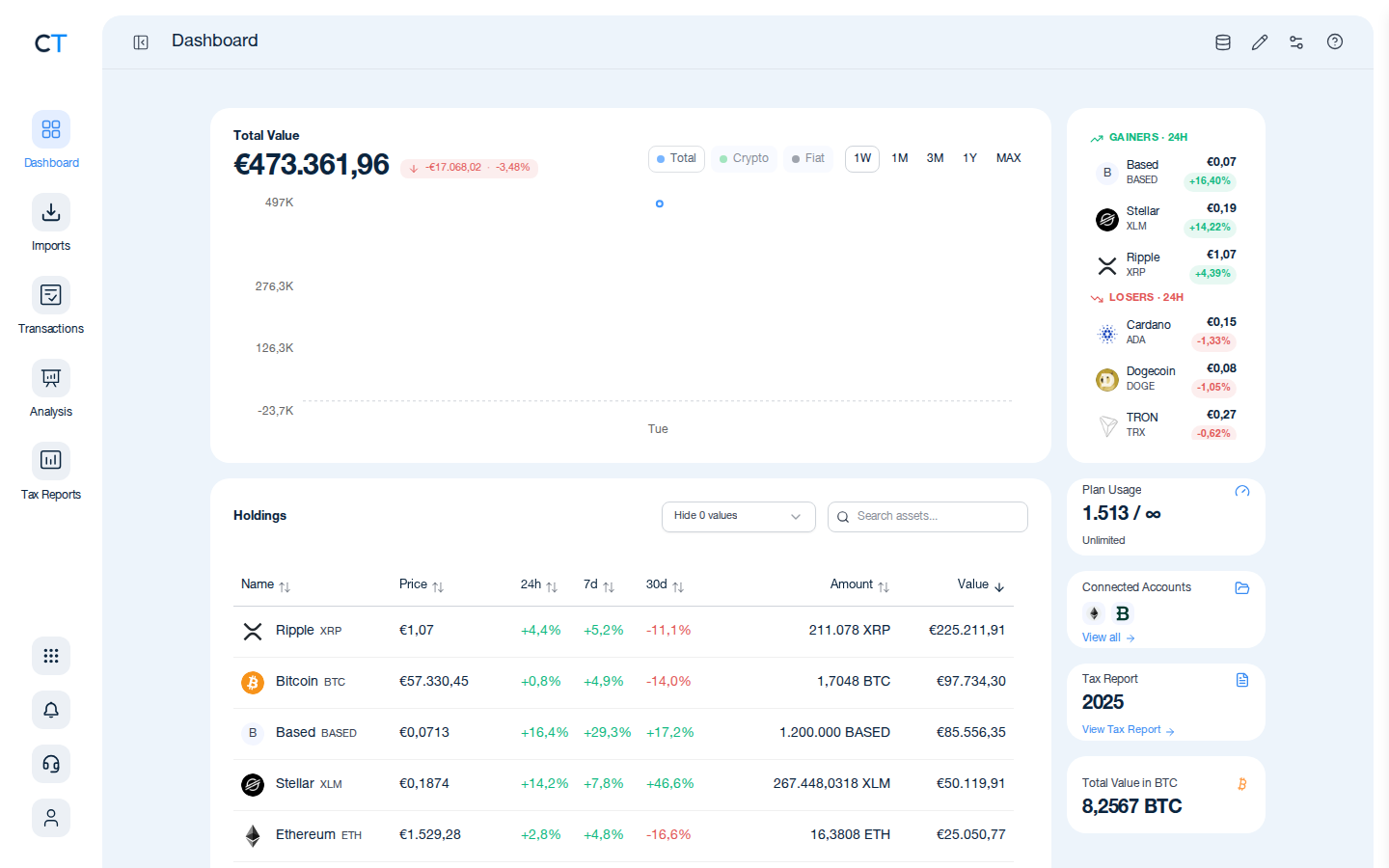
- 1
Log into CoinTracking and open Imports
After logging in, click the Import icon in the left navigation. This is where you connect all your exchanges, wallets and blockchains.
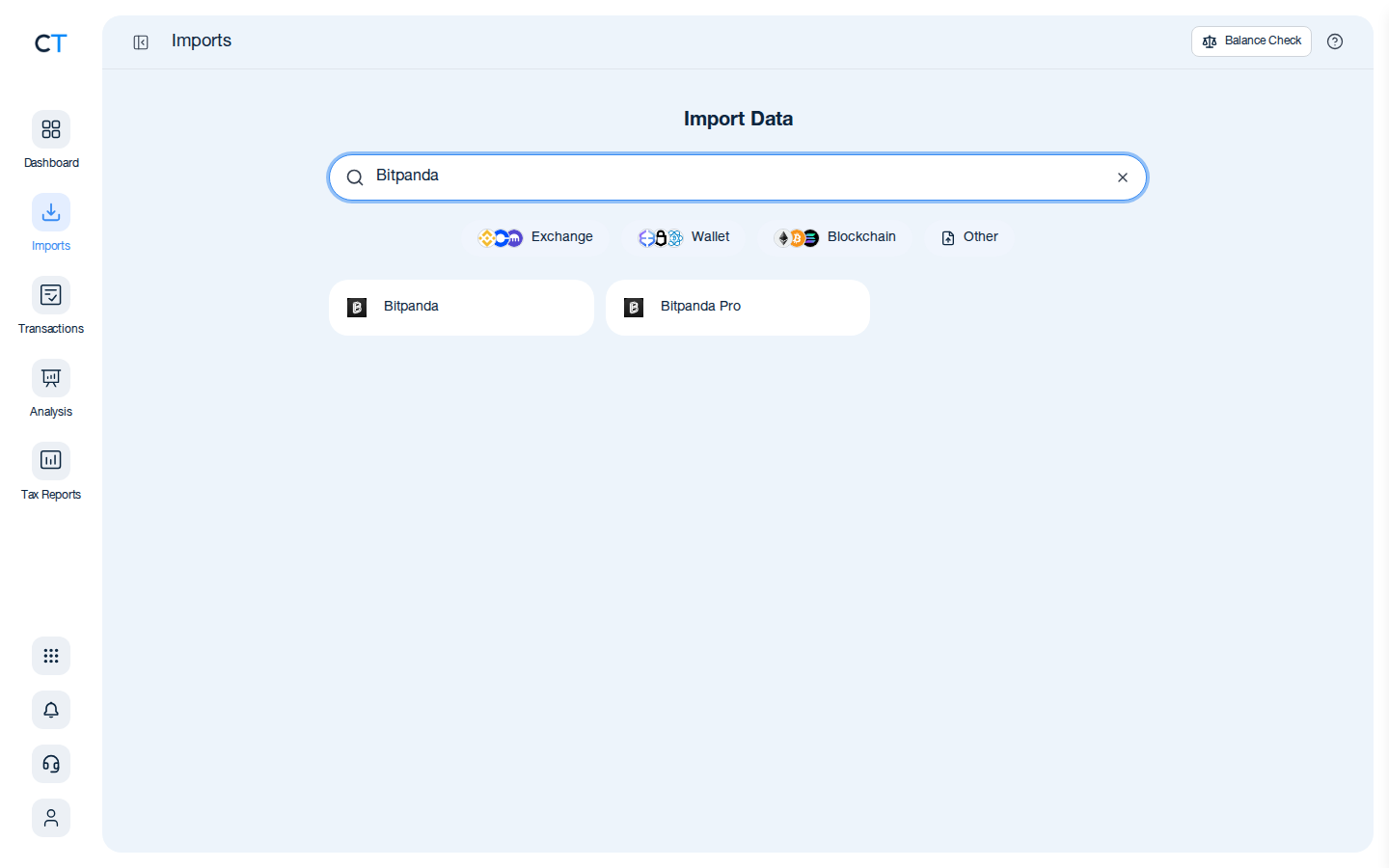
- 2
Search for Bitpanda in the import list
Type "Bitpanda" in the search field. CoinTracking will show the Bitpanda import option for CSV upload.
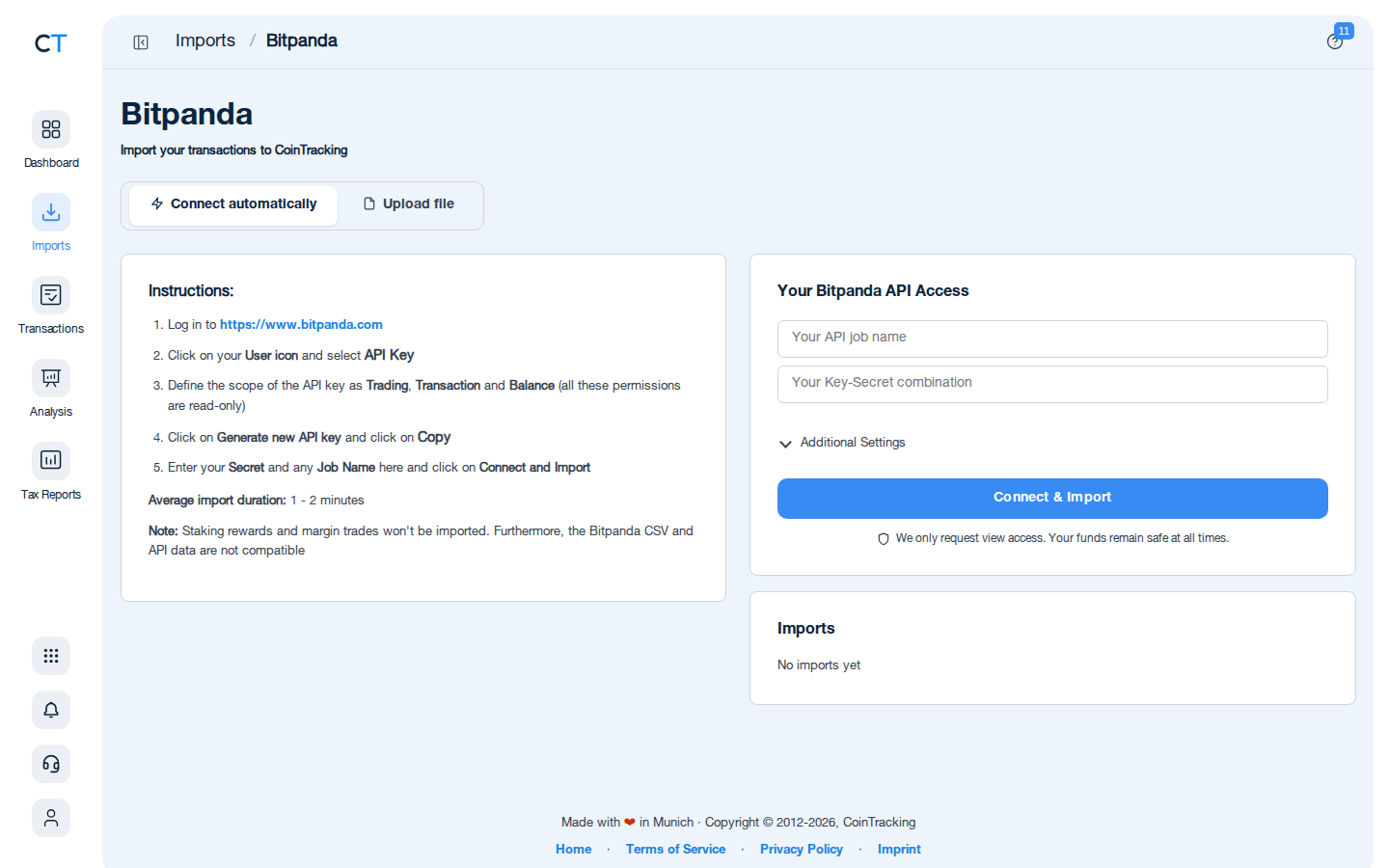
- 3
Upload your Bitpanda transaction history
Log into Bitpanda, navigate to your account settings to find the transaction history export, download the CSV file, and upload it to CoinTracking.
"CoinTracking can handle just about any complex transaction you can throw at it and the automation is a real lifesaver. Of all the tax software tools we've reviewed, CoinTracking is the most detail-oriented and has more accuracy checks in place than the competition."

How to Create Your Bitpanda
Tax Report with CoinTracking
Three steps from CSV export to a tax report your accountant will accept.

Export your Bitpanda transaction history
Log into Bitpanda, navigate to your account settings, find the transaction history section, and download the CSV file for your desired period.

Review your transactions
Open Reports → Validate Transactions. CoinTracking flags missing cost basis entries, duplicate imports and price gaps so your final report is accurate.

Generate and export your tax report
Select your country and tax year. CoinTracking generates a report formatted for your jurisdiction: PDF or Excel, ready to file or hand to your accountant.





No. Bitpanda does not generate a tax report for users. It offers a transaction history export in CSV format via your account settings. You are responsible for converting that data into a jurisdiction-specific tax report. CoinTracking imports your Bitpanda CSV and generates a complete, compliant report for your country.
Log into your Bitpanda account, navigate to your profile settings, select the transaction history or tax section, choose the time period you want to export, and download the CSV file. Then upload the CSV file directly into CoinTracking.
Yes. Bitpanda is regulated by the FMA (Austrian Financial Market Authority) and operates across Europe under EU financial regulations including MiCA. As an EU-regulated crypto asset service provider (CASP), Bitpanda is required under DAC8 to report transaction data to national tax authorities from 2026. This means your Bitpanda trades may be visible to your country's tax office.
Bitpanda's primary supported import method in CoinTracking is CSV. Export your transaction history from your Bitpanda account and upload it directly to CoinTracking. CoinTracking fully supports the Bitpanda CSV format.
In most EU countries, yes. Every sale, swap, or disposal of cryptocurrency is a taxable event. The gain or loss is the difference between your cost basis and the proceeds at the time of disposal. Tax-free thresholds and holding periods vary: Germany offers a 1-year exemption, Austria a flat 27.5% rate, Portugal a 1-year exemption for holdings since 2023.
DAC8 is an EU directive that requires licensed crypto asset service providers (CASPs) to automatically report user transaction data to national tax authorities starting from 2026. As a fully licensed CASP headquartered in Vienna, Austria, Bitpanda falls squarely within DAC8 scope. This means EU tax authorities will increasingly have access to your Bitpanda trading history, making accurate and complete tax reporting essential.
Start Tracking Your Crypto Taxes Today
Experience why 2.2 million users trust CoinTracking — sign up today for a seven-day free trial!