Revolut Crypto Taxes: How to Import Your Transactions & Generate Your Tax Report
Revolut is an EU-regulated neobank and crypto trading platform. As an EU-licensed bank (Revolut Bank UAB, Lithuania), it is subject to DAC8 — the EU directive requiring crypto platforms to report user transaction data to tax authorities from 1 January 2026. CoinTracking imports your full Revolut crypto history via CSV or XLS and generates a compliant tax report for your jurisdiction.

How to Import Your Revolut Transactions into CoinTracking
Watch how to export your Revolut crypto statement and import it into CoinTracking to generate your complete crypto tax report — accurate, compliant and ready to file.
Start Your Free Revolut Import- Every crypto trade, disposal and conversion inside Revolut is a taxable event in most jurisdictions. Selling crypto for fiat, swapping BTC for ETH, and spending crypto via your Revolut card all trigger a taxable disposal. CoinTracking classifies each event automatically.
- CoinTracking imports Revolut transactions via CSV or XLS export: go to Profile → Statements → Crypto Statement in the Revolut app, choose your date range, export the file, and upload it to CoinTracking. Your full crypto history is processed automatically.
- Depositing fiat to buy crypto is not a taxable event. Holding crypto in Revolut is not taxable. Only disposing of crypto — by selling, swapping, or spending — triggers a tax obligation.
- Revolut is EU-regulated and subject to DAC8. From 1 January 2026, Revolut Bank UAB is required to automatically report your crypto transaction data to EU tax authorities. Your tax authority will receive this data — ensure your tax return is consistent with it. CoinTracking helps you prepare a matching, accurate report.
Revolut and Your EU Tax Obligations
Revolut was founded in 2015 in London and has grown into one of Europe\'s largest neobanks, offering bank accounts, currency exchange, stock trading, and crypto — all in one app. Crypto trading was launched in 2017, allowing users to buy and sell digital assets directly in the app.
For EU customers, the relevant entity is Revolut Bank UAB, licensed as a bank in Lithuania and regulated by the Bank of Lithuania and the European Central Bank. This EU banking licence gives Revolut Bank UAB the status of an EU Crypto Asset Service Provider (CASP), making it subject to DAC8 reporting requirements from 1 January 2026.
UK customers are served by Revolut Ltd, which holds a UK banking licence, and are subject to HMRC CARF rules rather than DAC8. CoinTracking supports both UK and EU reporting scenarios.
CoinTracking supports Revolut via CSV and XLS import:
- Open the Revolut app and go to Profile → Statements
- Select Crypto Statement and choose your date range
- Export as CSV or XLS and save the file
- Search for "Revolut" in CoinTracking and upload the file

Crypto Tax Basics: What Revolut Users Need to Know
Revolut\'s massive EU user base spans dozens of countries, each with its own crypto tax rules. Below are the core principles that apply across the EU and UK — always verify specifics with your local tax authority or a qualified advisor.
Every crypto trade in Revolut is a taxable disposal
Whether you sell BTC for euros or swap ETH for SOL inside the Revolut app, each trade is a separate taxable disposal in the year it occurs. The taxable gain or loss is the difference between the proceeds and your cost basis (what you originally paid, including fees). CoinTracking tracks every Revolut disposal and applies the correct cost-basis method for your jurisdiction.
Revolut\'s custodial crypto model
Revolut holds crypto on users\' behalf — it is a custodial platform. In most EU jurisdictions, this does not change the tax treatment: disposals remain taxable regardless of whether you hold crypto on-chain or in a custodial account. However, it does mean you do not have on-chain transaction data to verify — Revolut\'s statement export is your authoritative record. CoinTracking imports this directly.
DAC8 — Revolut will report your transaction data
Under the EU DAC8 directive (effective from 1 January 2026), Revolut Bank UAB must collect and transmit transaction data — including trade amounts, proceeds, asset types and user identification — to the relevant EU national tax authority. This data is then automatically shared with the tax authority of the country where you are resident. If your declared income does not match what Revolut reports, your tax authority will detect the discrepancy.
Crypto-to-crypto swaps are taxable
In-app crypto conversions on Revolut — for example, converting BTC to ETH — are taxable disposals in most EU and UK jurisdictions, even if you never see fiat. Each swap creates two events: a disposal of the asset sold (potentially triggering a gain) and an acquisition of the asset received. CoinTracking imports all Revolut swap data and treats each conversion as a separate taxable event with its own cost basis entry.
Revolut Taxes by Country
Revolut is used by millions of customers across the EU and UK. Below are the key crypto tax rates and rules for the most common user countries.
 Germany
- Holding-period rule (§ 23 EStG): Tax-free if held over 1 year; taxed at personal income tax rate (up to 45%) if sold within 1 year
- Annual exemption: Gains up to €1,000/year from private disposal transactions are tax-free
- Cost basis: FIFO per wallet
- Crypto-to-crypto swaps: Taxable disposals in the year they occur
- DAC8: Revolut Bank UAB reports EU customer data to German Finanzamt from 2026
- Authority: Finanzamt
- Forms: Anlage SO
 United Kingdom
- Capital Gains Tax: 18% (basic rate) or 24% (higher rate) from October 2024
- Annual exempt amount: £3,000 (2024/25 onward)
- Cost basis: Section 104 pool (HMRC rules)
- Revolut entity: UK users are served by Revolut Ltd (UK banking licence) — governed by HMRC CARF, not DAC8
- Authority: HMRC
- Forms: Self Assessment SA100, SA108
 Lithuania
- Capital gains tax: 15% on crypto gains for individuals
- Annual exemption: €500 annual threshold for capital gains
- DAC8: Revolut Bank UAB is incorporated in Lithuania — Lithuanian residents are subject to DAC8 reporting to the State Tax Inspectorate (VMI)
- Authority: State Tax Inspectorate (VMI)
 Ireland
- Capital Gains Tax: 33% on crypto gains
- Annual exemption: €1,270 annual CGT exemption per individual
- Cost basis: First In, First Out (FIFO)
- DAC8: Revolut Bank UAB reports EU customer data including Irish residents to Revenue Commissioners
- Authority: Revenue Commissioners
- Forms: CG1 / Form 11
 France
- Flat 30% tax (PFU): Gains from crypto disposals are subject to prélèvement forfaitaire unique — 12.8% income tax + 17.2% social charges
- No holding-period exemption: Unlike Germany, there is no tax-free threshold after 1 year
- DAC8: Revolut Bank UAB reports EU customer data including French residents to DGFiP
- Authority: DGFiP
- Forms: Formulaire 2086
 Netherlands
- Box 3 wealth tax: Crypto holdings are declared as assets; effective rate approximately 1.2–2% of year-end value
- No capital gains tax on disposal: Realised gains are not separately taxed for private investors
- Box 1 for professional traders: Trading income may be taxed as business income at progressive rates up to 49.5%
- Authority: Belastingdienst
 Poland
- Flat rate: 19% on all crypto gains (no holding-period exemption)
- Loss carryforward: Up to 5 years
- Cost basis: FIFO
- DAC8: Revolut Bank UAB reports EU customer data including Polish residents to Urząd Skarbowy
- Authority: Urząd Skarbowy
- Form: PIT-38
 Spain
Spain
- Savings income (IRPF): 19% up to €6,000; 21% up to €50,000; 23% up to €200,000; 27% up to €300,000; 28% above
- Foreign crypto disclosure: Modelo 721 required if portfolio exceeds €50,000 abroad
- DAC8: Revolut Bank UAB reports EU customer data including Spanish residents to Agencia Tributaria
- Authority: Agencia Tributaria (AEAT)
- Forms: Modelo 100 (IRPF), Modelo 721
Tax rules change frequently. This overview is for general information only and does not constitute tax advice. Consult a qualified advisor for your specific situation.
Are Revolut Transactions Taxable?
In most jurisdictions, every crypto trade and disposal on Revolut triggers a taxable event. Use this as a starting reference — exact rules vary by country.
Taxable Events
- Selling crypto for fiat within Revolut
- Trading one crypto for another in Revolut
- Spending crypto on Revolut card
- Crypto rewards and cashback (as income)
Not Taxable
- Depositing fiat to buy crypto (not yet taxable)
- Holding crypto in Revolut
- Fiat-to-fiat conversions
- Transferring crypto between your own accounts
Tax treatment varies by country. CoinTracking applies the rules for your selected jurisdiction automatically.
How to Calculate Your Revolut Crypto Taxes
Revolut users who trade crypto actively may accumulate hundreds of transactions per year — buys, sells, swaps, and cashback rewards — each requiring accurate cost-basis tracking and income classification. Calculating this manually is time-consuming and error-prone without dedicated software.
CoinTracking imports your complete Revolut transaction history via CSV or XLS, applies your chosen cost-basis method (FIFO, Section 104, or others), calculates gains and losses for every disposal, classifies rewards as income, and produces a jurisdiction-specific tax report ready for your return.
With DAC8 enforcement live from 2026, your tax authority will receive your Revolut data directly. CoinTracking ensures your self-reported figures match exactly — eliminating any discrepancy before it becomes a problem.

How to Import Revolut into CoinTracking
Three steps to import your Revolut transactions and generate your tax report.
- 1
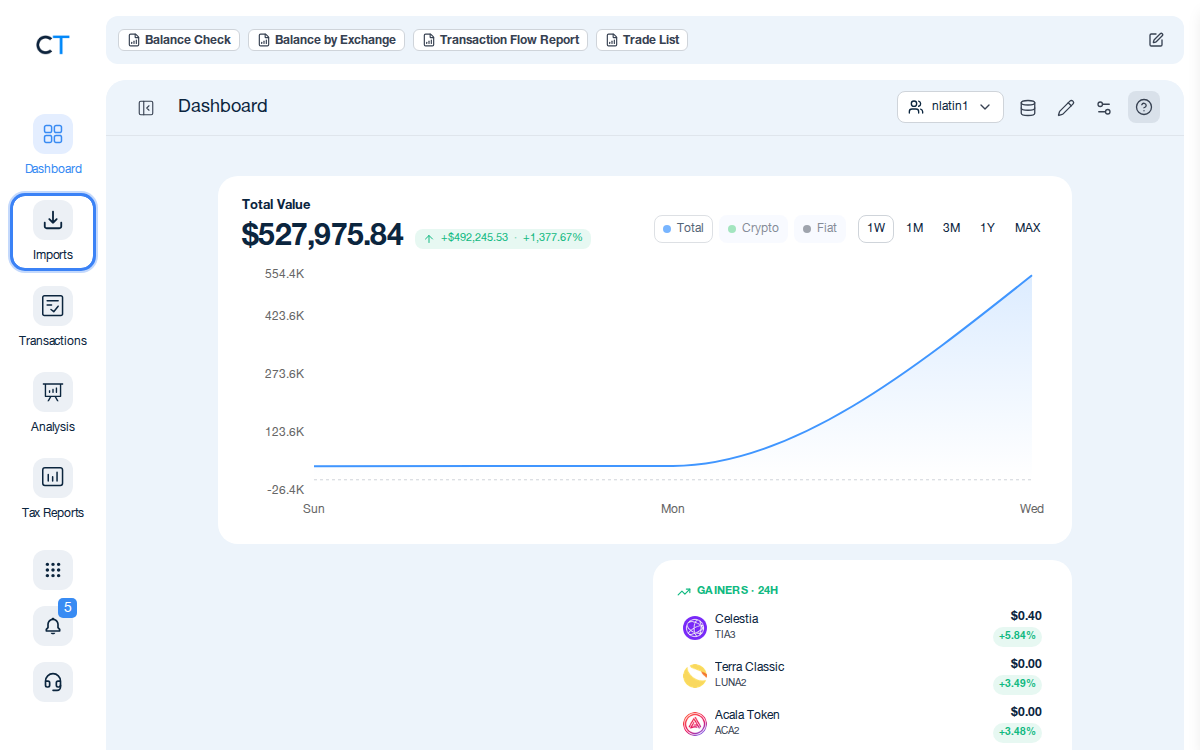
Log into CoinTracking and open Imports
After logging in, click the Import icon in the left navigation. This is where you connect all your exchanges, wallets and blockchains.
- 2
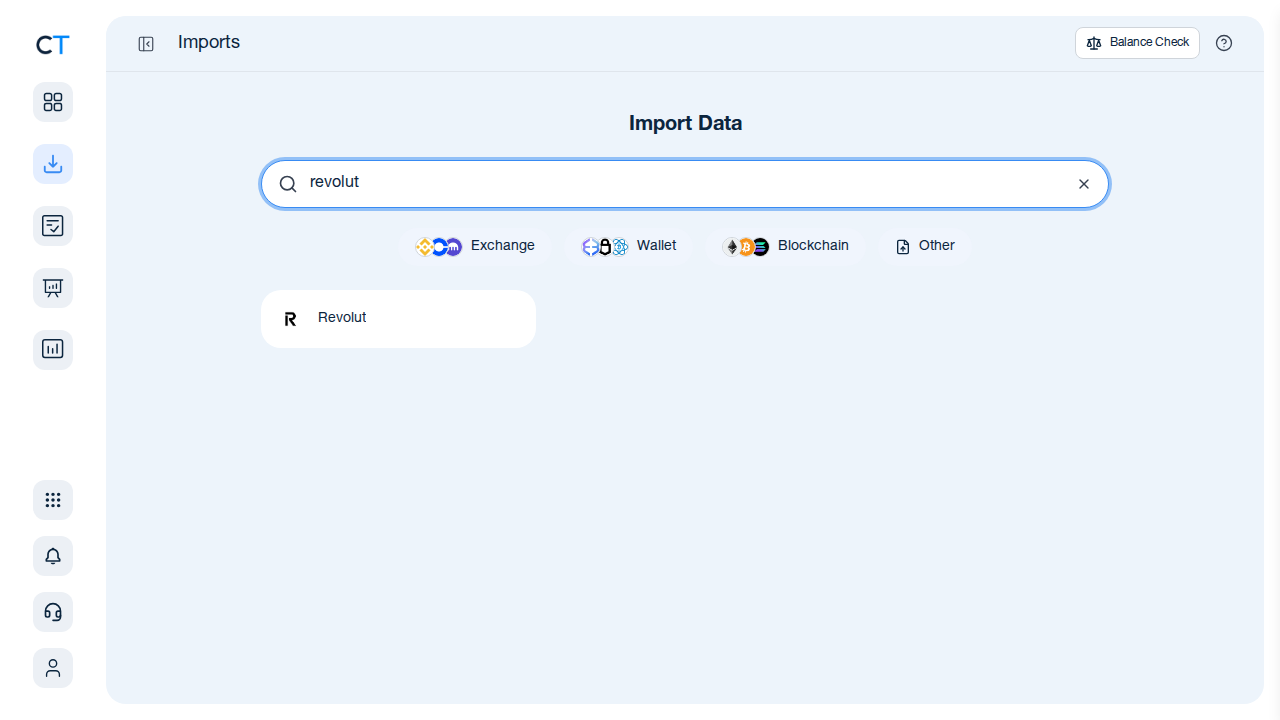
Search for Revolut and select the CSV/XLS import
Type "Revolut" in the search field. CoinTracking will show the Revolut import option — select it to access the CSV or XLS upload area.
- 3
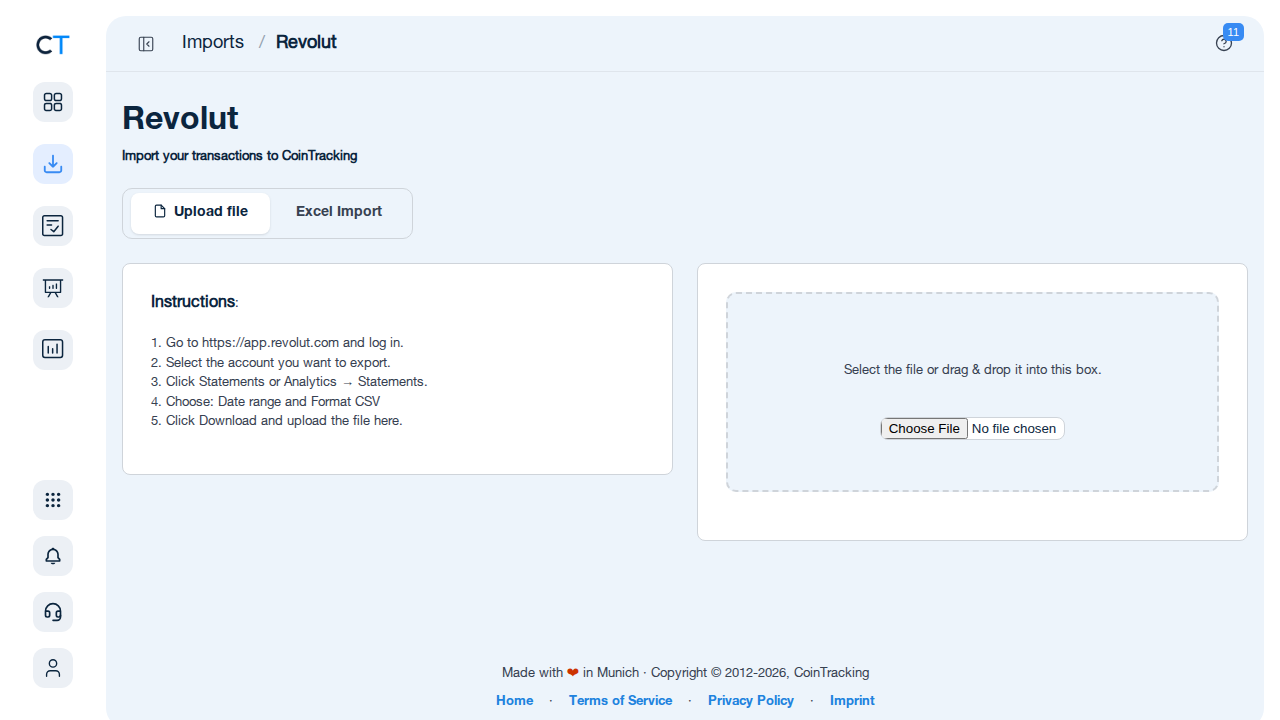
Upload your Revolut Crypto Statement export
In the Revolut app go to Profile → Statements → Crypto Statement, choose your date range and export as CSV or XLS. Upload the file to CoinTracking. All your trades, swaps and rewards will be imported and classified automatically.
"CoinTracking can handle just about any complex transaction you can throw at it and the automation is a real lifesaver. Of all the tax software tools we've reviewed, CoinTracking is the most detail-oriented and has more accuracy checks in place than the competition."

How to Create Your Revolut
Tax Report with CoinTracking
Three steps from Revolut to a tax report your accountant will accept.

Import your Revolut transactions
Export your Revolut Crypto Statement as CSV or XLS and upload it to CoinTracking. All trades, swaps, rewards and cashback are imported and classified automatically.

Review your transactions
Open Reports → Validate Transactions. CoinTracking flags missing cost basis entries, duplicate imports and price gaps so your final report is fully accurate.

Generate and export your tax report
Select your country and tax year. CoinTracking generates a report formatted for your jurisdiction — PDF or Excel — matching what Revolut reports to tax authorities under DAC8 or CARF.





No — Revolut provides a statement export (CSV or XLSX). CoinTracking imports this and generates a full tax report including all crypto trades, income and conversions.
In the Revolut app: go to Profile → Statements → Crypto Statement → choose date range → Export as CSV or XLS. Upload the file to CoinTracking using the import search.
Yes. DAC8 means Revolut will send your transaction data to your national tax authority. But you still need to include the gains and income in your tax return — the authority receives raw data, not a completed tax calculation. CoinTracking bridges this gap by calculating your exact tax position from the raw Revolut data.
Yes — every crypto-to-crypto conversion in Revolut (e.g. BTC to ETH) is a taxable disposal in the year it occurs, in most jurisdictions. CoinTracking imports all Revolut swap data and treats each conversion as a separate taxable event.
Germany: FIFO per wallet (§ 23 EStG). UK: Section 104 pooling (HMRC). Ireland: First In, First Out. CoinTracking supports FIFO, LIFO, HIFO and all major methods.
DAC8 applies to EU-regulated entities and their EU-resident customers. UK users of Revolut Ltd (UK entity) are governed by HMRC CARF rules, not DAC8. CoinTracking handles both UK and EU reporting scenarios.
Start Tracking Your Crypto Taxes Today
Experience why 2.2 million users trust CoinTracking — sign up today for a seven-day free trial!