NovaExchange Taxes: How to Import Historical Data & Generate Your Tax Report
NovaExchange was a small altcoin trading platform that closed in 2019. Its closure does not erase your tax obligations — every trade you made on the platform was a taxable event in the year it occurred. CoinTracking can import your historical NovaExchange data and generate a tax report ready for your accountant or tax authority, covering any outstanding prior-year liability.

How to Import Your NovaExchange Transactions into CoinTracking
Watch how to upload your historical NovaExchange transaction data into CoinTracking and generate your complete crypto tax report — even for a closed exchange.
Start Your Free NovaExchange Import- Every crypto trade and disposal made on NovaExchange was a taxable event. Capital gains tax and income tax obligations remain in force for prior tax years — the closure of the exchange does not change this.
- CoinTracking can import historical NovaExchange trading data from a CSV export if you saved one before the platform closed. Manual entry is also available for reconstructed records.
- Transferring crypto between your own wallets is generally not a taxable event. Only buying, selling, or trading crypto constitutes a disposal triggering tax.
- NovaExchange has been closed since 2019. You can still import historical data if you have a CSV export. Your tax obligations for trades made on NovaExchange remain in effect — all gains and income from prior years must be declared. If you have not yet filed, consider a voluntary disclosure to your tax authority.
NovaExchange and Your Crypto Tax Obligations
NovaExchange was a small cryptocurrency exchange that specialised in altcoin trading, particularly Bitcoin-based trading pairs for lesser-known tokens. Founded around 2014, it operated until early 2019 when it announced its closure, citing regulatory challenges and the difficulty of maintaining a compliant service.
The platform is no longer accessible, but the tax obligations arising from trades made on NovaExchange during its operation remain legally in force. Tax authorities in most countries require crypto traders to declare all disposals in their annual returns — regardless of whether the exchange is still operating.
If you have historical NovaExchange data:
- Upload any saved CSV export to CoinTracking using the import search
- Use CoinTracking\'s manual entry for records reconstructed from emails or screenshots
- Generate back-tax reports for any prior year to catch outstanding obligations
- CoinTracking supports FIFO, LIFO, HIFO and other methods for historical trades

Crypto Tax Basics for Former NovaExchange Traders
NovaExchange closed in 2019, but tax obligations from its active years span multiple prior tax filings. Here is what former NovaExchange users need to understand about their ongoing crypto tax obligations.
Trades are taxable in the year they occur
In most jurisdictions, a crypto disposal is taxable in the year it occurred — not when you first realise or report the gain. Trades made on NovaExchange in 2018 or earlier are subject to the tax rules of those years. Waiting to declare does not eliminate the obligation; it can increase it due to interest and late-filing penalties.
Voluntary disclosure reduces penalties
If you have undeclared NovaExchange activity from prior years, most tax authorities offer a voluntary disclosure programme — where taxpayers can self-report errors and omissions in exchange for reduced or waived penalties. In Germany this is the Selbstanzeige; in the UK it is the HMRC Voluntary Disclosure process; the IRS operates the Voluntary Disclosure Program in the US. Proactively disclosing is almost always preferable to an audit.
Record-keeping obligations
Tax authorities typically require crypto traders to retain records for at least 5 to 7 years (longer in some jurisdictions). If you no longer have your NovaExchange transaction history, document whatever evidence you do have. CoinTracking\'s manual entry feature allows you to reconstruct trades from memory or partial records, and the resulting report can serve as your best-available-information filing.
NovaExchange Taxes by Country
Crypto tax rules vary by jurisdiction. Here are the key rates and rules for countries where NovaExchange was commonly used.
 Germany
- § 23 EStG: Gains taxed at personal income tax rate (up to 45%) if sold within 1 year; tax-free if held over 1 year
- Freigrenze: €1,000/year in private disposal gains exempt
- Cost basis: FIFO per wallet
- Voluntary disclosure: Selbstanzeige — possible to self-report prior-year gains
- Forms: Anlage SO
 Austria
- 27.5% KESt: Assets acquired after 28 Feb 2021 taxed at 27.5% on disposal
- Older assets: May be grandfathered; consult a tax advisor for pre-2021 activity
- Authority: Finanzamt Austria
 United Kingdom
- Capital Gains Tax: 18% (basic rate) / 24% (higher rate) from October 2024
- Annual exempt amount: £3,000 (2024/25 onward)
- Cost basis: Section 104 pooling (HMRC)
- Voluntary disclosure: HMRC Voluntary Disclosure process for prior-year errors
 United States
- Short-term gains: Ordinary income tax rates (up to 37%) for assets held ≤1 year
- Long-term gains: 0%, 15% or 20% for assets held >1 year
- Cost basis: FIFO or specific identification
- Voluntary disclosure: IRS Voluntary Disclosure Program (VDP) for prior-year unreported income
- Authority: IRS
 Switzerland
- Capital gains: Generally tax-free for private investors; professional traders taxed as self-employed
- Wealth tax: Crypto holdings subject to cantonal wealth tax at year-end value
- Authority: Cantonal tax authority
 Netherlands
- Box 3 wealth tax: Crypto declared as assets; effective rate ~1.2–2% of year-end value
- No realised capital gains tax for private investors
- Authority: Belastingdienst
 France
- PFU 30%: 12.8% income tax + 17.2% social charges on crypto gains
- Authority: DGFiP. Formulaire 2086.
 Spain
Spain
- IRPF savings income: 19%–28% on crypto gains (graduated rates)
- Authority: Agencia Tributaria (AEAT)
 Poland
- Flat 19%: On all crypto gains (no holding-period exemption)
- Authority: Urząd Skarbowy. Form PIT-38.
Tax rules change frequently. This overview is for general information only. Consult a qualified advisor for your specific situation.
Are NovaExchange Transactions Taxable?
In most jurisdictions, every crypto trade on NovaExchange was a taxable event. Use this as a starting reference — exact rules vary by country and year.
Taxable Events
- Trading one crypto for another on NovaExchange
- Selling crypto for fiat (where supported)
- Receiving trading fees or bounties as income
- Any crypto disposal (sale, trade, or spending)
Not Taxable
- Depositing crypto to NovaExchange from your own wallet
- Withdrawing crypto back to your own wallet
- Holding crypto in your NovaExchange account
- Transferring between personal wallets
Tax treatment varies by country and by the tax year in which the trade occurred.
How to Calculate Your NovaExchange Taxes
NovaExchange traders who made many trades across multiple altcoin pairs may have complex cost-basis chains that are difficult to unwind manually — especially years after the fact. Calculating historical gains accurately requires knowing the market price of each asset at the time of each trade.
CoinTracking imports your historical NovaExchange data, applies your chosen cost-basis method (FIFO, LIFO, HIFO), uses its built-in historical price database to fill in any missing market prices, and generates a complete tax report for the relevant years. The result is a jurisdiction-specific report ready for your accountant, covering any historical liability from your NovaExchange trading activity.
How to Import NovaExchange into CoinTracking
Three steps to import your historical NovaExchange data and generate your tax report.
- 1
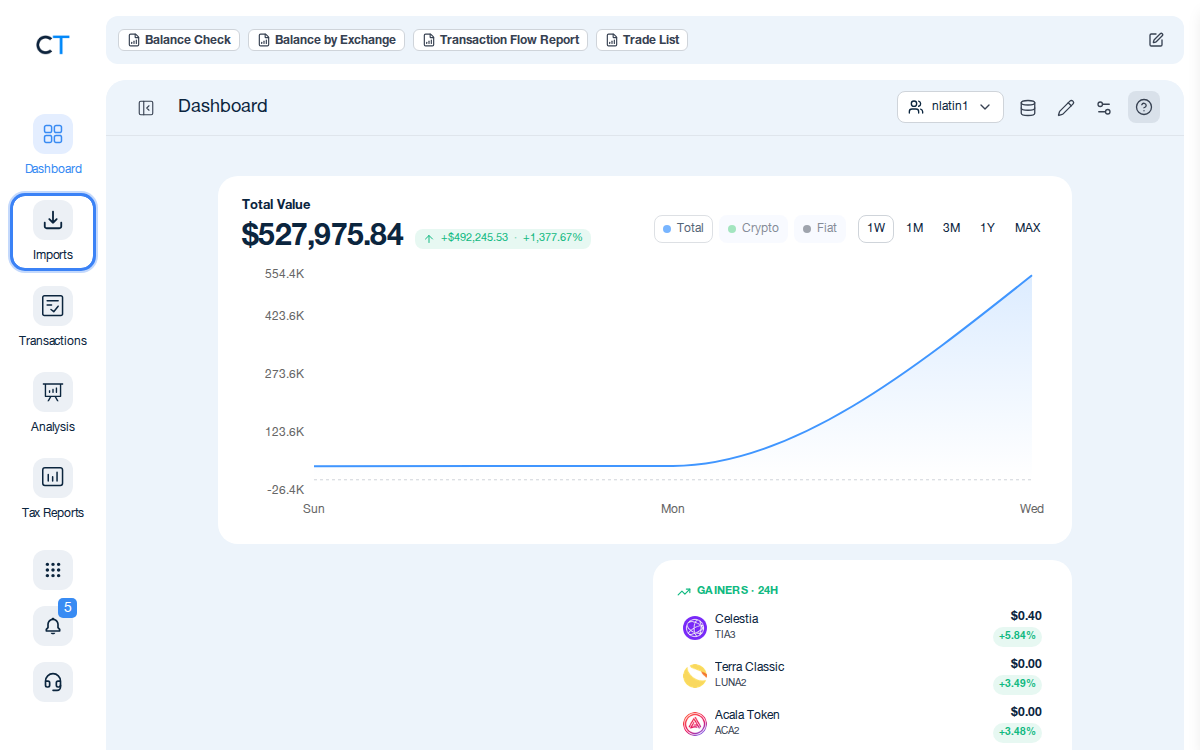
Log into CoinTracking and open Imports
After logging in, click the Import icon in the left navigation. This is where you add all your historical exchange data, wallets and blockchains.
- 2
Search for NovaExchange or use CSV import
Type "NovaExchange" in the import search. If a direct match is not available, use the CSV import option to upload any transaction export you saved from NovaExchange before it closed. CoinTracking supports a wide range of legacy CSV formats.
- 3
Review and generate your back-tax report
Once your historical NovaExchange data is imported, validate the transactions and generate a tax report for the relevant prior years. CoinTracking calculates gains and losses using FIFO (or your chosen method) and formats the report for your jurisdiction.
"CoinTracking can handle just about any complex transaction you can throw at it and the automation is a real lifesaver. Of all the tax software tools we've reviewed, CoinTracking is the most detail-oriented and has more accuracy checks in place than the competition."

How to Create Your NovaExchange
Tax Report with CoinTracking
Three steps from historical CSV to a tax report your accountant will accept.

Import your historical NovaExchange data
Upload any saved NovaExchange CSV to CoinTracking or use manual entry for reconstructed records. All historical altcoin trades and transfers are supported.

Review and validate your transactions
Open Reports → Validate Transactions. CoinTracking flags missing cost basis, duplicate imports and price gaps — especially important when working with historical data from a closed exchange.

Generate your back-tax report
Select your country and the relevant prior tax year. CoinTracking generates a jurisdiction-specific report in PDF or Excel format, ready to file or hand to your accountant.





No. NovaExchange was a small altcoin exchange that closed in 2019. It did not generate a tax report. If you have a transaction history export from NovaExchange, you can import it into CoinTracking. CoinTracking will calculate your gains, losses and income from your historical NovaExchange activity and generate a tax report ready for your jurisdiction.
If you exported your NovaExchange transaction history before the platform closed, you can upload it to CoinTracking using the CoinTracking import search. CoinTracking supports a range of CSV formats from legacy exchanges. If you no longer have a direct export, any trading records you saved (screenshots, order histories, email confirmations) can help you reconstruct your history manually or with CoinTracking's manual entry feature.
Yes. The closure of NovaExchange does not cancel your tax obligations for trades made while the platform was active. Capital gains from crypto disposals are taxable in the year the disposal occurred — not when you realise the profit or file a return. If you have unreported NovaExchange activity from prior tax years, you should consider filing amended returns or a voluntary disclosure with your tax authority.
NovaExchange was not an EU-regulated CASP and is no longer operating, so it is not subject to DAC8 or any ongoing regulatory reporting obligations. However, your personal tax obligations for gains and income from NovaExchange activity remain in force regardless of the platform's regulatory status or closure.
The correct cost-basis method depends on your jurisdiction. Germany requires FIFO per wallet (§ 23 EStG); the UK uses Section 104 pooling (HMRC rules); the US allows FIFO or specific identification. CoinTracking supports FIFO, LIFO, HIFO, and other methods and applies the correct rules for your selected country. Transaction fees paid on NovaExchange can generally be added to your cost basis, reducing your taxable gain.
If you did not save a CSV export before NovaExchange closed, your options are limited but not zero. Check your email for trade confirmations, look for any account statements you may have downloaded, or try to reconstruct trades from on-chain records if the assets were settled on public blockchains. CoinTracking's manual entry tool lets you enter historical trades one-by-one if no automated import is available.
Start Tracking Your Crypto Taxes Today
Experience why 2.2 million users trust CoinTracking — sign up today for a seven-day free trial!