BX Thailand Taxes: How to Report Your Historical Crypto Gains
BX Thailand (BX.in.th) closed in September 2019, but the tax obligations from your trades don't disappear with the exchange. CoinTracking imports your saved BX Thailand CSV history, converts Thai Baht to your local currency, calculates gains and losses, and generates a tax report covering every year you traded on BX.in.th.

How to Import Your BX Thailand Transactions into CoinTracking
Watch how to upload your saved BX Thailand CSV file into CoinTracking to generate your crypto tax report for historical trades from 2014–2019.
Start Your Free BX Thailand Import- BX Thailand operated from 2014 to September 2019. Every crypto trade, swap and disposal made on BX.in.th during that period is a taxable event in most jurisdictions — the exchange's closure does not erase your obligations.
- Import method is CSV only. BX Thailand is offline and has no API. Upload your saved BX Thailand transaction CSV to CoinTracking to reconstruct your full trade history.
- BX Thailand traded in Thai Baht (THB). CoinTracking automatically converts all historical THB values to your local reporting currency using historical exchange rates.
- Defunct exchange — historical records only. BX Thailand permanently closed in September 2019. The website (bx.in.th) is no longer accessible. If you have not yet saved your transaction CSV, you may need to reconstruct your history from email confirmations and blockchain explorers.
BX Thailand and Your Tax Obligations
BX Thailand (bx.in.th) was Thailand's largest cryptocurrency exchange, launched in 2014 and shut down on 1 September 2019. At its peak it handled hundreds of millions of dollars in daily trading volume and was the primary gateway for Thai traders buying and selling Bitcoin, Ethereum and other major cryptocurrencies.
Despite the exchange's closure, the tax implications of trades made on BX.in.th remain. In most countries, capital gains tax applies to the year a trade was made, and tax authorities typically have multi-year audit windows that extend well past the exchange's shutdown date.
CoinTracking supports BX Thailand via CSV file upload:
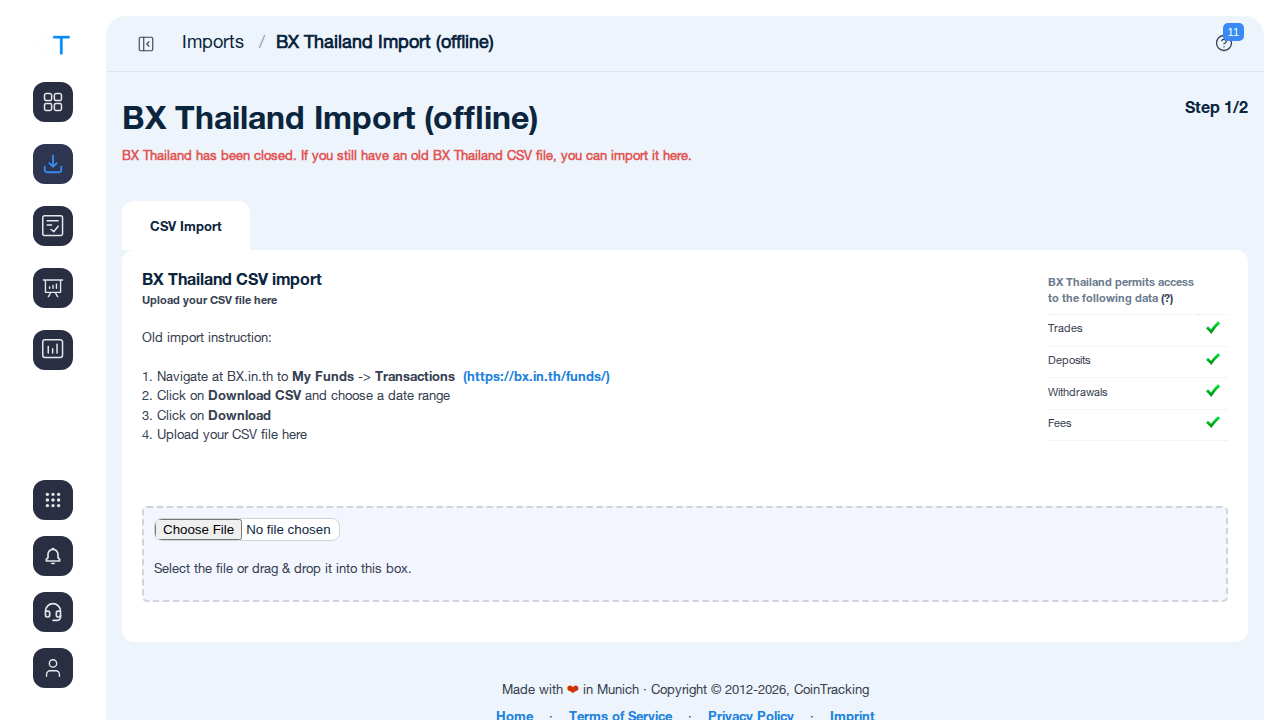
- BX Thailand CSV: exported from bx.in.th via My Funds → Transactions → Download CSV (before the exchange closed in September 2019)
- Trades, deposits, withdrawals and fees are all supported
- CoinTracking maps BX Thailand CSV columns automatically and converts THB to your reporting currency
Crypto Tax Basics: What BX Thailand Users Need to Know
Reporting historical trades from a defunct exchange comes with specific challenges. These principles apply broadly, but always verify with your local tax authority or a qualified advisor.
Historical trades are still taxable
In most jurisdictions, every crypto sale or swap is a taxable disposal in the year it occurred. Trades made on BX Thailand between 2014 and 2019 created taxable gains or losses in those years. If you have not yet reported them, filing an amended return may be appropriate depending on your country's statute of limitations.
Thai Baht conversion is required
BX Thailand conducted its trades in Thai Baht (THB). Your tax authority requires proceeds and cost basis in your local reporting currency. This means each historical trade must be converted from THB to your domestic currency using the exchange rate on the date of the transaction. CoinTracking automates this conversion using historical fiat rate data.
Records are your responsibility
BX Thailand's closure means the exchange can no longer provide transaction records on demand. If you saved your CSV export before the shutdown, you can upload it directly to CoinTracking. If you did not, you will need to reconstruct your history from available sources: email trade confirmations, withdrawal receipts, and blockchain explorer lookups on any wallet addresses you used with the exchange. CoinTracking maintains a complete audit trail of every transaction you import.
BX Thailand Taxes by Country
Your BX Thailand trades are taxed under the rules of your home country, not Thailand's. Below are key rates, deadlines and filing forms for the countries where CoinTracking users most commonly need to report historical crypto gains.
 Germany
- Disposal tax: Personal income tax rate (up to 45%); gains are tax-free if held longer than 1 year (Haltefrist)
- Annual exemption: Gains up to €1,000/year are tax-free (since 2024)
- Staking income: Taxed as other income (Sonstige Einkünfte)
- Cost basis: FIFO per wallet
- Authority: Finanzamt
- Forms: Anlage SO, Anlage KAP
 United Kingdom
- Capital Gains Tax: 18% (basic rate) or 24% (higher rate) from October 2024
- Annual exempt amount: £3,000 (2024/25 onward)
- Staking income: Income Tax at marginal rate
- Cost basis: Section 104 pool (HMRC rules)
- Authority: HMRC
- Forms: Self Assessment SA100, SA108
 Australia
- Capital Gains Tax: Included in assessable income at marginal rate; 50% CGT discount applies if asset held more than 12 months
- Cost basis: FIFO or specific identification
- Staking income: Ordinary income at marginal rate when received
- Authority: Australian Taxation Office (ATO)
- Form: Individual Tax Return (myTax)
 United States
- Short-term gains (held under 1 year): Ordinary income tax (10-37%)
- Long-term gains (held 1 year or longer): 0%, 15%, or 20% depending on income
- Staking rewards: Taxable as ordinary income when received
- Cost basis: FIFO (default); specific identification permitted
- Authority: IRS
- Forms: Form 8949, Schedule D
 Singapore
- Capital gains: No capital gains tax in Singapore. Casual investors generally not taxed on crypto disposals.
- Trading income: If crypto trading is a business activity, profits are taxed as income at the corporate or individual rate
- Authority: Inland Revenue Authority of Singapore (IRAS)
- Note: IRAS applies a substance test — frequent high-volume traders may be considered to be carrying on a business
 Canada
- Inclusion rate: 50% of capital gains included in taxable income (2024 rate; proposed increases apply above C$250,000)
- Business income: 100% included if crypto trading is a business activity
- Cost basis: Adjusted Cost Base (ACB) — pooled per coin
- Authority: Canada Revenue Agency (CRA)
- Forms: Schedule 3, T1 General
 Netherlands
- Box 3 wealth tax: Crypto is treated as a capital asset; a notional return is taxed at ~36% on the assumed yield
- Valuation date: 1 January of each tax year — portfolio value on that date determines the taxable base
- No capital gains tax: Individual investors are not taxed on realised gains under Box 3
- Authority: Belastingdienst
- Form: Aangifte inkomstenbelasting (IB aangifteformulier)
 France
- Flat 30% tax (PFU): Gains from crypto disposals are subject to the prelevement forfaitaire unique (PFU) — 12.8% income tax + 17.2% social charges.
- No exemption for holding period: Unlike Germany, there is no tax-free threshold after 1 year.
- Staking income: Taxed as BNC (non-commercial income) if received regularly; otherwise as capital gains.
- Authority: Direction generale des Finances publiques (DGFiP). Declare via Formulaire 2086.
 Austria
- 27.5% capital gains tax: Since March 2022, crypto is taxed like shares — a flat 27.5% KESt (Kapitalertragsteuer) applies to gains.
- Old coins grandfathered: Crypto acquired before 28 February 2021 is tax-free on disposal (no KESt applies).
- Staking and lending: Treated as capital income, also taxed at 27.5%.
- Authority: Finanzamt Austria. Report via Einkommensteuererklarung (E1 / E1kv).
Tax rules change frequently. This overview is for general information only and does not constitute tax advice. Consult a qualified advisor for your specific situation.
Are BX Thailand Transactions Taxable?
In most jurisdictions, every crypto disposal on BX.in.th is a taxable event — even if the exchange shut down years ago. Use this as a starting reference. The exact rules vary by country.
Taxable Events
- Selling crypto for Thai Baht (THB) or other fiat
- Swapping one crypto for another on BX.in.th
- Using crypto to pay for goods or services
- Receiving crypto as income, rewards or interest
Not Taxable
- Buying and holding crypto
- Transferring crypto between your own wallets
- Depositing fiat to BX Thailand
- Receiving crypto as a personal gift
Tax treatment varies by country. CoinTracking applies the rules for your selected jurisdiction automatically.
How to Calculate Your BX Thailand Taxes
BX Thailand trades were denominated in Thai Baht. To calculate your taxable gain, you need your cost basis (what you paid) and your proceeds (what you received), both converted to your local reporting currency at the exchange rate on the day of each transaction.
The core calculation: proceeds minus cost basis equals gain or loss. For assets held across multiple purchases, CoinTracking uses FIFO (first-in, first-out) by default, matching the accounting method required by most tax authorities.
CoinTracking automates this across your full BX Thailand history and produces a year-by-year tax report your accountant or local tax authority will accept.
How to Import BX Thailand into CoinTracking
Three steps to upload your BX Thailand CSV and generate your historical tax report.
- 1
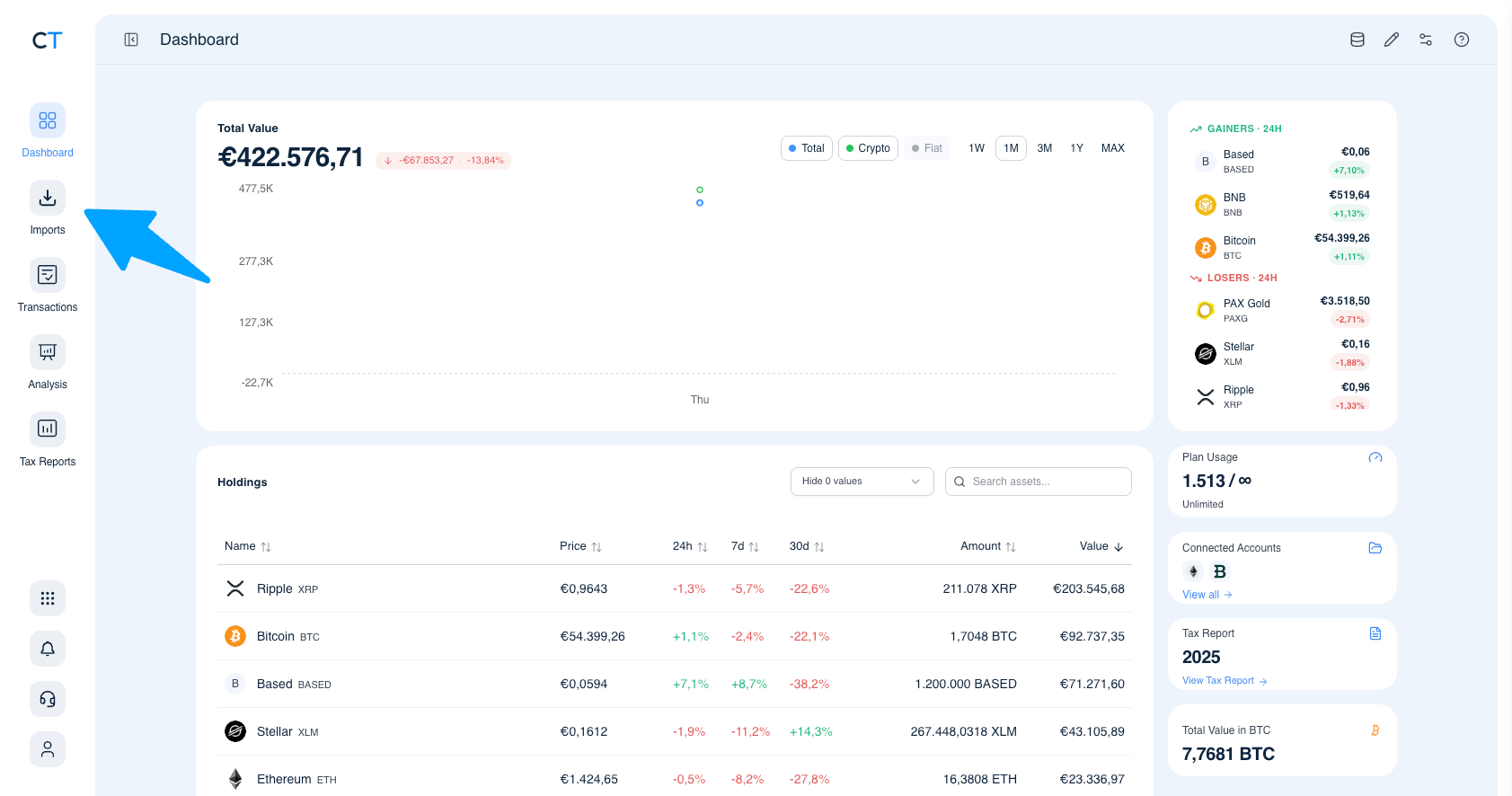
Log into CoinTracking and open Imports
After logging in, click the Import icon in the left navigation. This is where you connect all your exchanges, wallets and blockchains.
- 2
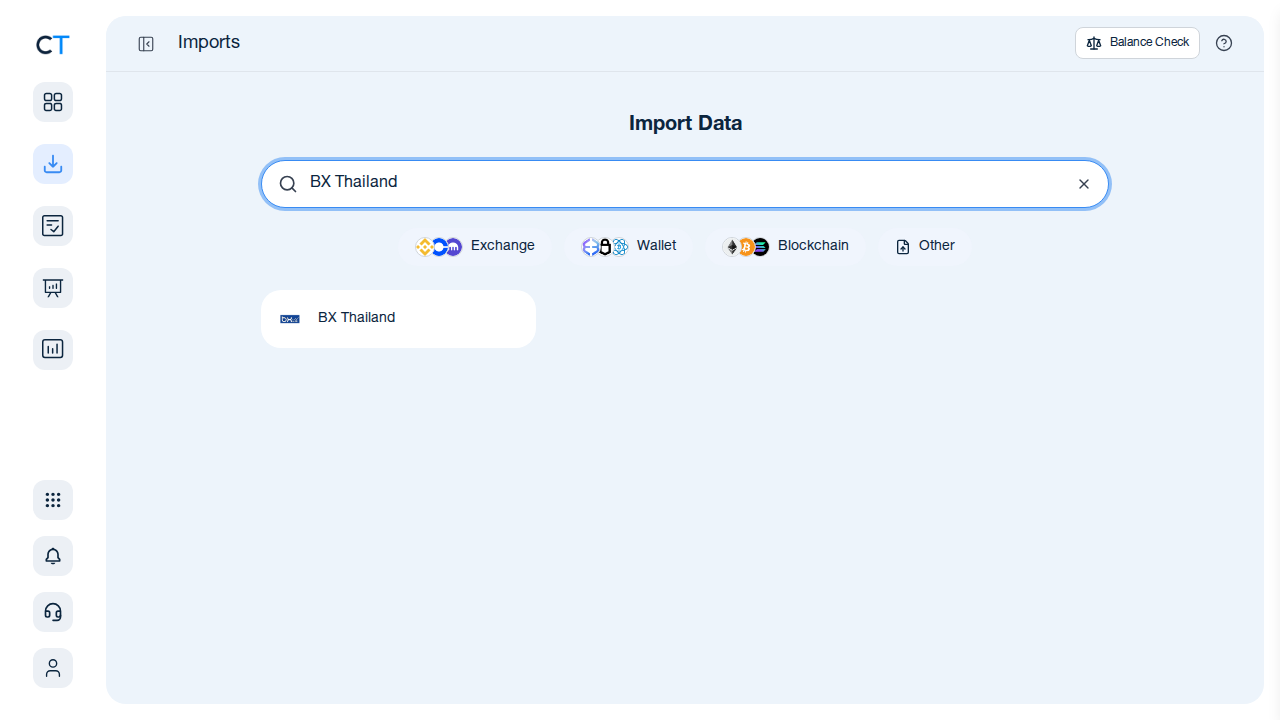
Search for BX Thailand in the import list
Type "BX Thailand" in the search field. CoinTracking will show the BX Thailand import option.
- 3
Upload your BX Thailand CSV file
Click the BX Thailand card and upload your saved CSV file. The file was originally exported from bx.in.th via My Funds → Transactions → Download CSV. CoinTracking maps the columns automatically.
"CoinTracking can handle just about any complex transaction you can throw at it and the automation is a real lifesaver. Of all the tax software tools we've reviewed, CoinTracking is the most detail-oriented and has more accuracy checks in place than the competition."

How to Create Your BX Thailand
Tax Report with CoinTracking
Three steps from your historical CSV to a tax report your accountant will accept.

Locate your BX Thailand CSV export
Find your saved BX Thailand CSV export from bx.in.th (My Funds → Transactions → Download CSV). If you no longer have it, check email confirmations from BX.in.th and blockchain explorer records for your wallet addresses.

Review your historical transactions
Open Reports → Validate Transactions. CoinTracking flags missing cost basis entries, duplicate imports and price gaps so your final report covering all BX Thailand trading years is accurate.

Generate and export your tax report
Select your country and tax year. CoinTracking generates a year-by-year report formatted for your jurisdiction: PDF or Excel, ready to file or hand to your accountant.





Yes. The closure of BX Thailand in September 2019 does not erase your tax obligations. Any gains realised while trading on BX.in.th between 2014 and 2019 remain taxable events in the year they occurred. Many tax authorities have multi-year audit windows (typically 5–10 years), so unreported historical gains can still attract penalties. CoinTracking imports your saved BX Thailand CSV history and calculates the gains and losses for each relevant tax year.
BX Thailand shut down in September 2019 and the exchange website is no longer accessible. If you exported your trade history via My Funds → Transactions → Download CSV before the exchange closed, you can still upload that file to CoinTracking. If you did not save your records, check your email for order confirmations or withdrawal receipts, and any blockchain explorers for on-chain transactions. If you have partial records, CoinTracking can help you reconstruct as complete a history as possible.
BX Thailand denominated trades in Thai Baht (THB). For tax purposes, you must convert each transaction into your local reporting currency using the exchange rate on the date of the transaction. CoinTracking handles this conversion automatically using historical fiat exchange rates, so all your gains and losses are reported in the currency your tax authority requires.
If you no longer have your BX Thailand export file, your options are limited because the exchange is offline. Check old email confirmations from BX.in.th for trade receipts, review any blockchain explorers for deposits and withdrawals to your BX Thailand wallet address, and check whether you have a backup of the CSV in cloud storage, old downloads folders, or hard drives. Partial records are better than none — CoinTracking can work with whatever data you can recover.
CoinTracking supports BX Thailand via CSV file upload only. Since BX Thailand shut down in 2019, there is no live API connection available. Navigate to Imports → search for "BX Thailand" → select the exchange → upload your saved BX Thailand CSV file. CoinTracking will map the columns automatically and import your trades, deposits, withdrawals and fees.
BX Thailand operated from approximately 2014 until September 2019. If you traded during that period, your potential tax history spans up to five trading years. Depending on your country's statutes of limitations, you may need to file amended returns or disclose previously unreported gains. CoinTracking supports reporting for all years and all supported jurisdictions, so you can generate a historical tax report covering your full BX Thailand trading period.
Start Tracking Your Crypto Taxes Today
Experience why 2.2 million users trust CoinTracking — sign up today for a seven-day free trial!