CoinList Taxes: How to Generate Your Crypto Tax Report
Every trade, token-sale allocation, and disposal through your CoinList account creates a taxable event. CoinTracking imports your CoinList transaction history via CSV export, calculates gains and losses across your full trading and token-sale history, and generates a tax report ready for your accountant or tax authority — no matter how many token sales you participated in.

How to Import Your CoinList Transactions into CoinTracking
Watch how to download your CoinList transaction CSV and import it into CoinTracking to generate your complete crypto tax report — including token-sale allocations.
Start Your Free CoinList Import- Every crypto trade, swap, token-sale allocation, and disposal through your CoinList account is a taxable event in most jurisdictions. Capital gains tax and income tax may both apply depending on transaction type.
- CoinTracking imports CoinList transactions via CSV export (manual upload). Download your full transaction history from the CoinList Wallet section and upload it to CoinTracking.
- Transferring crypto between your own wallets or accounts is not a taxable event. Buying and holding crypto is not taxable until disposal.
- Tax compliance is your responsibility. CoinList is a US-based company. While it may report certain account data to tax authorities as required by law, it does not file your tax return. All trades, token-sale allocations, and disposals on your CoinList account must be declared by you. Failing to report crypto gains can result in penalties and back-tax assessments.
CoinList and Your Tax Obligations
CoinList is a US-based cryptocurrency exchange best known for hosting token sales and initial exchange offerings (IEOs) for emerging blockchain projects. It gives retail and accredited investors early access to token allocations before broader market listing, as well as standard spot trading, staking, and wallet services.
All transactions executed through your CoinList account generate taxable events. Whether you trade spot markets, receive token-sale allocations, earn staking rewards, or transfer assets, each event must be reported to your tax authority.
CoinTracking supports CoinList via CSV import:
- CoinList CSV: download your full transaction history from the Wallet section and upload it directly to CoinTracking
- All spot trades, token-sale allocations, deposits, and withdrawals are supported
- Multiple CSV uploads (covering different date ranges) can be combined in CoinTracking
- Token-sale cost basis is correctly tracked from the date of allocation

Crypto Tax Basics: What CoinList Users Need to Know
CoinList serves traders and token-sale participants across many jurisdictions. The core tax principles below apply broadly — but always verify the specifics with your local tax authority or a qualified tax advisor.
Every disposal is a taxable event
In most countries, selling, swapping, or otherwise disposing of cryptocurrency triggers capital gains tax. The gain or loss equals the difference between your proceeds and your cost basis (what you originally paid, including fees). For token-sale participants, the cost basis is the price you paid for the allocation — often in BTC, ETH, or USD at the time of the sale.
Token sales and IEO allocations
Participating in a token sale on CoinList is generally treated as purchasing an asset. Your cost basis is established at the time of allocation. When you later sell or swap those tokens, capital gains tax applies. In some jurisdictions, receiving tokens at below-market prices may also create an income tax event at the time of receipt. Always confirm the treatment with a qualified tax professional for your specific situation.
Record-keeping requirements
Accurate record-keeping is essential for every trade and token-sale event. Each transaction must be documented with the date, asset, quantity, cost basis, proceeds, and applicable fees. CoinList provides a CSV export for this purpose — but the raw data must be converted into a structured tax report. CoinTracking maintains a complete, dated audit trail of every CoinList transaction you import and produces reports formatted for your jurisdiction.
CoinList Taxes by Country
Crypto tax rules differ by market. Below are the key rates, deadlines and filing forms for the countries where CoinTracking users trade most actively.
 Germany
- Disposal tax: Personal income tax rate (up to 45%); gains are tax-free if held longer than 1 year (Haltefrist)
- Annual exemption: Gains up to €1,000/year are tax-free
- Token sales: Allocation treated as asset purchase; holding period starts at allocation date
- Cost basis: FIFO per wallet
- Authority: Finanzamt
- Forms: Anlage SO, Anlage KAP
 Austria
- 27.5% capital gains tax: Since March 2022, crypto is taxed like shares — a flat 27.5% KESt applies to gains.
- Old coins grandfathered: Crypto acquired before 28 February 2021 is tax-free on disposal.
- Token sales: Allocation treated as asset acquisition; gain calculated on disposal.
- Authority: Finanzamt Austria. Report via Einkommensteuererklärung (E1 / E1kv).
 Switzerland
- Capital gains: Generally tax-free for private investors; professional traders are taxed as self-employed income
- Wealth tax: Crypto holdings subject to wealth tax at cantonal rates based on year-end market value
- Token sales: Income element (discount vs. market price) may be taxable; consult a cantonal advisor
- Authority: Cantonal tax authority (varies by canton)
 United Kingdom
- Capital Gains Tax: 18% (basic rate) or 24% (higher rate) from October 2024
- Annual exempt amount: £3,000 (2024/25 onward)
- Token sales: HMRC treats token allocations as asset acquisitions; gain taxed on disposal
- Cost basis: Section 104 pool (HMRC rules)
- Authority: HMRC
- Forms: Self Assessment SA100, SA108
 Spain
Spain
- Savings income (IRPF): 19% up to €6,000; 21% up to €50,000; 23% up to €200,000; 27% up to €300,000; 28% above
- Foreign crypto disclosure: Modelo 721 required if portfolio exceeds €50,000 abroad
- Authority: Agencia Tributaria (AEAT)
- Forms: Modelo 100 (IRPF), Modelo 721
 Poland
- Flat rate: 19% on all crypto gains (no holding period exemption)
- Loss carryforward: Up to 5 years
- Cost basis: FIFO
- Authority: Urząd Skarbowy
- Form: PIT-38
 Italy
Italy
- Flat rate: 26% on gains exceeding €2,000/year (from 2023)
- Foreign holdings disclosure: Quadro RW required if portfolio exceeds €15,000
- Authority: Agenzia delle Entrate
- Forms: Quadro RT (gains), Quadro RW (foreign holdings)
 Portugal
- Disposal tax: 28% on gains from crypto held less than 1 year (from 2023)
- Long-term holding: Tax-free on disposal if held 1 year or longer
- Authority: Autoridade Tributária (AT)
- Forms: Modelo 3, Anexo G or Anexo J
 France
- Flat 30% tax (PFU): Gains from crypto disposals are subject to the prélèvement forfaitaire unique (PFU) — 12.8% income tax + 17.2% social charges.
- No exemption for holding period: Unlike Germany, there is no tax-free threshold after 1 year.
- Authority: Direction générale des Finances publiques (DGFiP). Declare via Formulaire 2086.
Tax rules change frequently. This overview is for general information only and does not constitute tax advice. Consult a qualified advisor for your specific situation.
Are CoinList Transactions Taxable?
In most jurisdictions, crypto is treated as an asset: disposing of it triggers capital gains tax. Token-sale allocations may also have an income component. Use this as a starting reference — exact rules vary by country.
Taxable Events
- Selling crypto for fiat (EUR, USD, etc.)
- Swapping or trading crypto for crypto
- Using crypto to pay for goods or services
- Staking rewards and income received
Not Taxable
- Buying and holding crypto
- Transferring crypto between your own accounts
- Depositing fiat to CoinList
- Receiving crypto as a personal gift
Tax treatment varies by country. CoinTracking applies the rules for your selected jurisdiction automatically.
How to Calculate Your CoinList Taxes
CoinList traders and token-sale participants can accumulate hundreds of taxable events across multiple years — especially if they participated in multiple IEOs and then sold those tokens at various prices. Calculating cost basis, holding periods, and gains for each event manually is time-consuming and error-prone.
CoinTracking imports your complete CoinList trade history via CSV, applies your chosen cost-basis method (FIFO, LIFO, HIFO, and others), calculates gains and losses for every disposal, and separates trading income from capital gains in your final report.
The result is a jurisdiction-specific tax report — PDF or Excel — that your accountant or tax authority will accept, with a full audit trail for every transaction including token-sale allocations.
How to Import CoinList into CoinTracking
Three steps to import your CoinList transactions and generate your tax report.
- 1
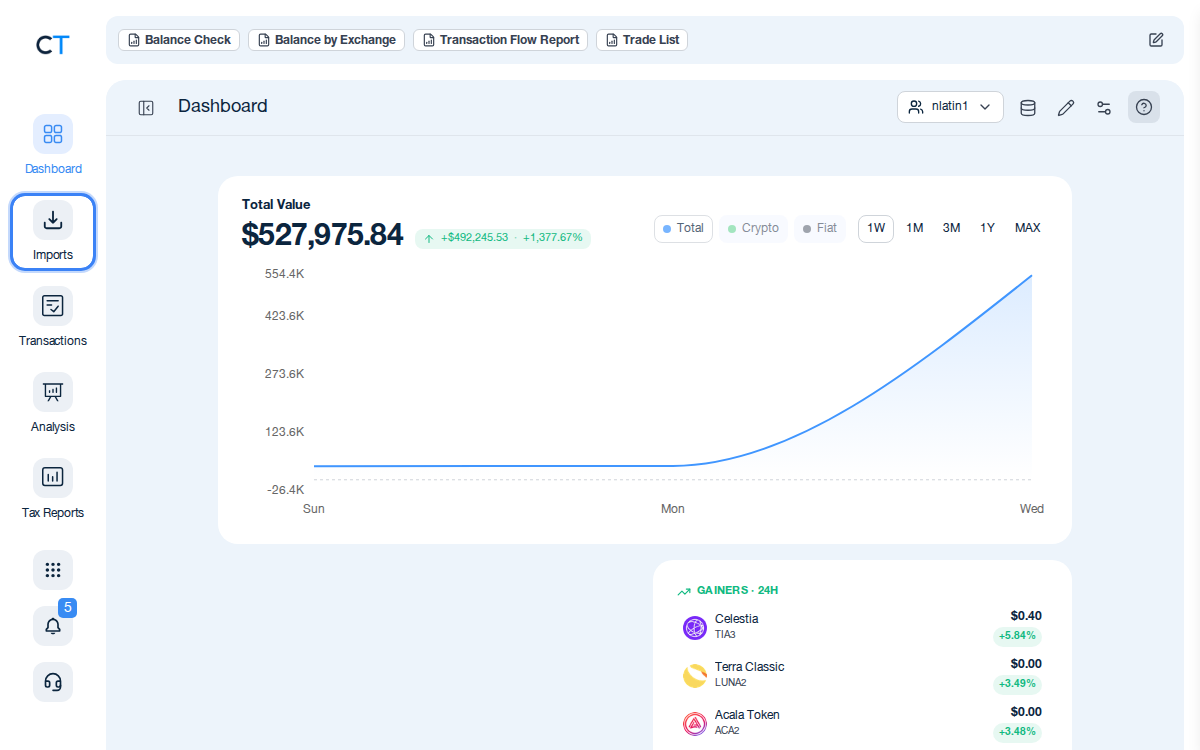
Log into CoinTracking and open Imports
After logging in, click the Import icon in the left navigation. This is where you connect all your exchanges, wallets and blockchains.
- 2
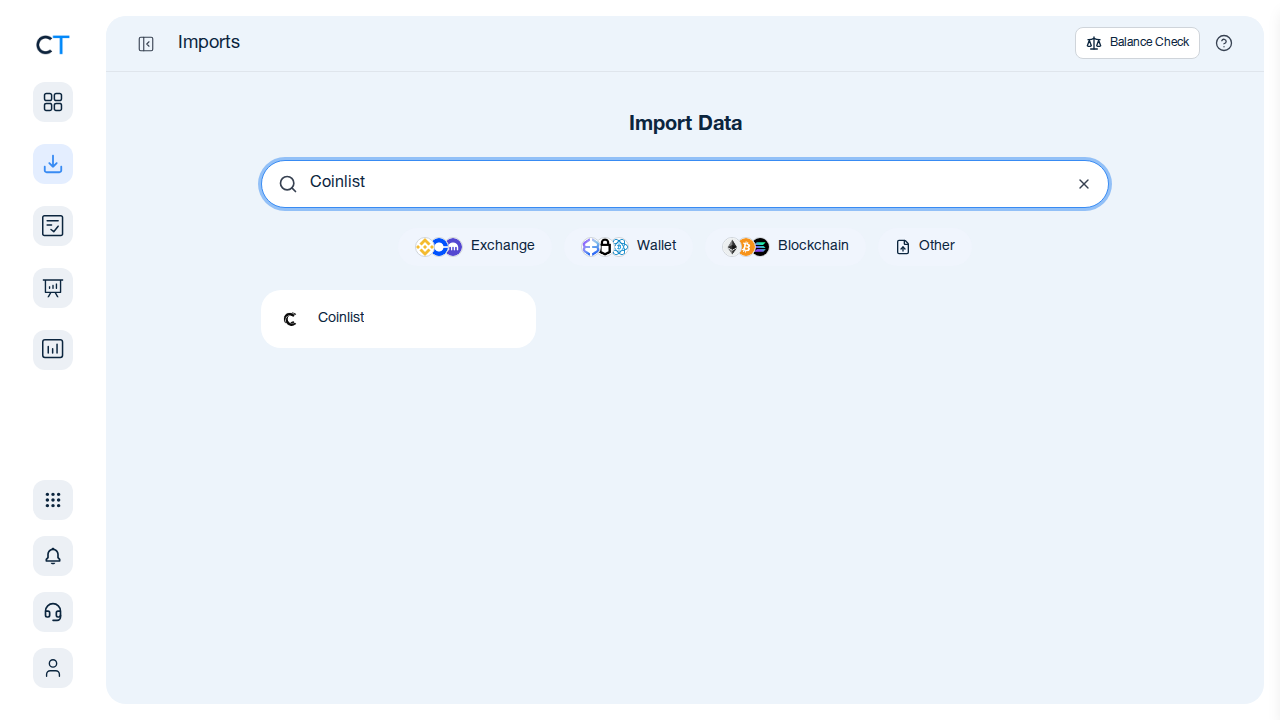
Search for CoinList in the import list
Type "CoinList" in the search field. CoinTracking will show the CoinList import option — select it to proceed with your CSV upload.
- 3
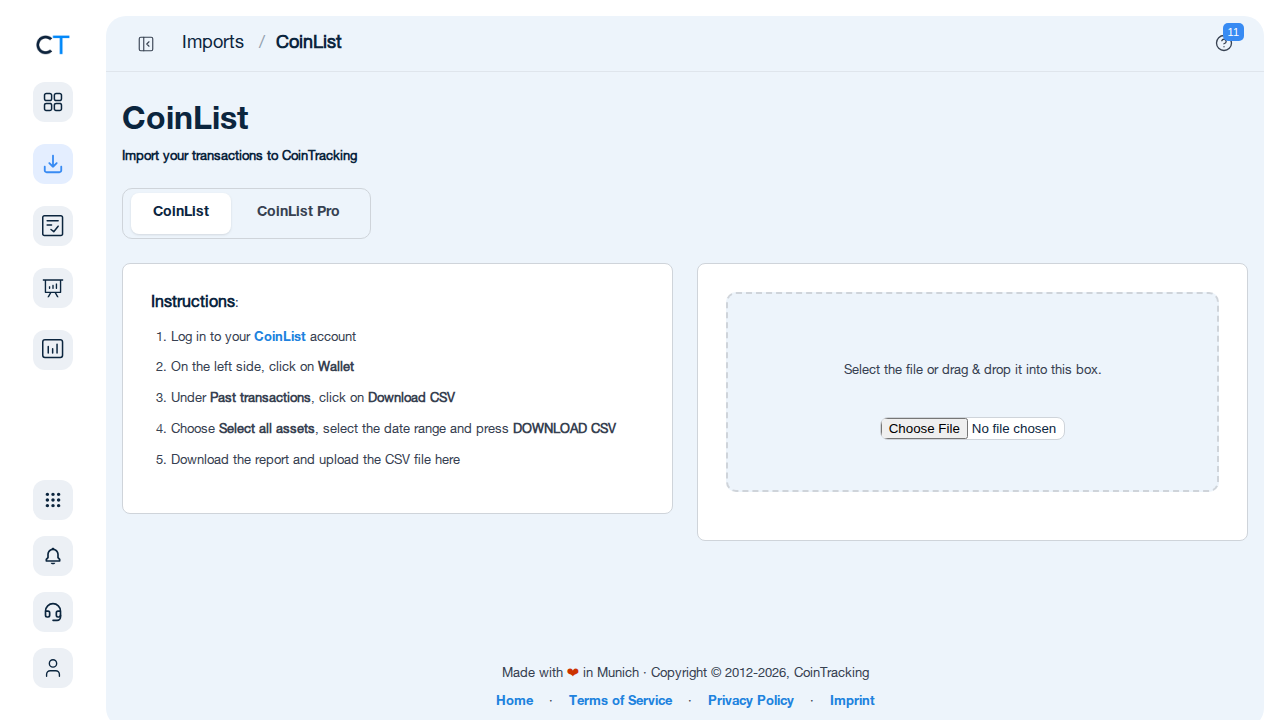
Upload your CoinList CSV export
Download your transaction history CSV from the CoinList Wallet section (Past Transactions → Download CSV, select all assets and your full date range), then upload it directly to CoinTracking. All trades, token-sale allocations, deposits, and withdrawals will be imported automatically.
"CoinTracking can handle just about any complex transaction you can throw at it and the automation is a real lifesaver. Of all the tax software tools we've reviewed, CoinTracking is the most detail-oriented and has more accuracy checks in place than the competition."

How to Create Your CoinList
Tax Report with CoinTracking
Three steps from CSV export to a tax report your accountant will accept.

Import your CoinList transactions
Download your full transaction history CSV from the CoinList Wallet section and upload it to CoinTracking. All trades, token-sale allocations, deposits, and withdrawals are imported automatically.

Review your transactions
Open Reports → Validate Transactions. CoinTracking flags missing cost basis entries, duplicate imports and price gaps so your final report is accurate — especially important for multi-year token-sale histories.

Generate and export your tax report
Select your country and tax year. CoinTracking generates a report formatted for your jurisdiction: PDF or Excel, ready to file or hand to your accountant.



No. CoinList does not generate a ready-to-file tax report. It provides a transaction history via CSV export, which you can import into CoinTracking. CoinTracking then calculates gains, losses, and income across all your CoinList trades and token-sale allocations and generates a compliant tax report for your jurisdiction.
Log in to your CoinList account, click on Wallet in the left-side navigation, and under Past Transactions click Download CSV. Select "All assets", choose your date range, and press Download. Upload the resulting CSV file to CoinTracking to import your full transaction history — including trades, deposits, withdrawals, and token-sale allocations.
Yes. Every sale, swap, or disposal of cryptocurrency through your CoinList account is a taxable event in most jurisdictions. Capital gains tax applies to the difference between your cost basis and the proceeds. Token-sale allocations and staking rewards are typically taxable as ordinary income in the year received. Tax-free thresholds and holding-period exemptions vary by country.
Token sales (IEOs) on CoinList are generally treated as asset purchases. The cost basis of your allocation is what you paid (in USD, BTC, ETH, or other currency) at the time of the sale. When you later sell or swap those tokens, capital gains tax applies based on the difference between the proceeds and your original cost basis. In some jurisdictions, receiving tokens at a discount may also create an income tax event at the time of receipt. CoinTracking tracks your CoinList allocations and calculates the correct tax treatment for each disposal.
CoinList is a US-based company and may be required to report certain account data to tax authorities (such as the IRS) as required by applicable law. However, CoinList does not file your tax return on your behalf. You remain responsible for declaring your gains, losses, and income from CoinList activity. CoinTracking helps you produce a complete, accurate tax report for any jurisdiction.
Yes. CoinTracking imports your full CoinList CSV — including spot trades, token-sale allocations, deposits, and withdrawals — and calculates your cost basis and gains across all transaction types. Multiple CSV uploads (covering different date ranges) are supported so you can import your complete history even if it spans several years. The final tax report separates capital gains from income for each jurisdiction.
Start Tracking Your Crypto Taxes Today
Experience why 2.2 million users trust CoinTracking — sign up today for a seven-day free trial!