BTCPay Server Taxes: How to Generate Your Crypto Tax Report
Merchants using BTCPay Server must declare every Bitcoin payment they receive as income. CoinTracking imports your complete BTCPay transaction history via CSV export, calculates your income and capital gains, and generates a tax report you can hand directly to your accountant or tax authority.

How to Import Your BTCPay Transactions into CoinTracking
Watch how to export your invoice history from BTCPay Server as a CSV file and import it into CoinTracking to generate your crypto tax report.
Start Your Free BTCPay Import- Every Bitcoin payment your business receives through BTCPay Server is taxable income. The fair market value at the time of receipt must be declared.
- BTCPay Server import uses CSV export from the Invoices section. Log in → Invoices → Export → CSV, then upload to CoinTracking.
- If you hold Bitcoin received through BTCPay and its value changes before you sell it, the price difference is an additional capital gain or loss.
- BTCPay Server is self-hosted and open-source — there is no centralised company reporting your transactions to tax authorities under DAC8. You are solely responsible for your own tax declarations.
BTCPay Server and Your Tax Obligations
BTCPay Server is a free, open-source Bitcoin payment processor that merchants self-host on their own infrastructure. Because it is not a centralised exchange or custodian, it operates entirely differently from platforms like Coinbase or Binance — and so does the tax picture.
Every invoice you settle through BTCPay creates a taxable event. The Bitcoin you receive has a fair market value at the moment of receipt that must be treated as income. If you subsequently hold that Bitcoin and its price moves before you convert it, the gain or loss must also be recorded.
CoinTracking supports BTCPay Server via CSV file upload:
- BTCPay Invoices CSV: downloaded from your BTCPay Server instance under Invoices → Export → CSV
- All settled invoice transactions, refunds and payment events are supported
- CoinTracking maps BTCPay CSV columns automatically and assigns correct transaction types
Crypto Tax Basics: What BTCPay Merchants Need to Know
Accepting Bitcoin payments creates two distinct tax obligations that most merchants underestimate.
Bitcoin payments are business income
When a customer pays you in Bitcoin via BTCPay, the value of that Bitcoin at the time of settlement is treated as gross income — just like a payment in dollars or euros. You must record the date, the amount in BTC and the fair market value in your local currency. CoinTracking imports your BTCPay CSV and converts every payment to your home currency at the correct exchange rate.
Holding Bitcoin creates a capital gains layer
If you receive Bitcoin as income and then hold it, you have established a cost basis at the date of receipt. When you later sell or spend that Bitcoin, the difference between the sale price and your cost basis is a capital gain or loss. CoinTracking tracks both the income layer and the capital gains layer automatically.
Self-hosting does not remove tax liability
Because BTCPay Server is self-hosted software with no central company, your transaction data is never automatically shared with tax authorities (unlike centralised exchanges under DAC8). This means the responsibility for accurate, complete reporting falls entirely on you. CoinTracking maintains a complete audit trail of every imported BTCPay transaction, giving you the documentation you need.
BTCPay Merchant Taxes by Country
Tax rules for Bitcoin merchant income differ significantly by jurisdiction. Below are the key rates, treatment of crypto income and relevant filing guidance for countries where CoinTracking users commonly run BTCPay stores.
 Germany
- Business income: Bitcoin received as payment is taxed as Betriebseinnahme at your personal income tax rate (up to 45%)
- Capital gains on held BTC: If treated as Betriebsvermögen, gains are business income; if private, § 23 EStG applies with 1-year exemption
- VAT on Bitcoin payments: Generally exempt from VAT per EU Court of Justice ruling (C-264/14)
- Cost basis: FIFO
- Authority: Finanzamt
- Forms: Anlage G or S (business income), Anlage SO (private capital gains)
 United Kingdom
- Business income: Bitcoin payments received by a trading business are trading receipts taxed at Corporation Tax (25%) or Income Tax (up to 45% for sole traders)
- Capital Gains Tax on disposal: 18% (basic rate) or 24% (higher rate); annual exempt amount £3,000
- HMRC treatment: Cryptoassets received as payment are subject to Income Tax/NIC at the value on receipt date
- Authority: HMRC
- Forms: Self Assessment SA100, SA103 (sole trader), CT600 (company)
 United States
- Business income: Bitcoin received for goods/services is gross income at FMV on receipt; subject to self-employment tax if self-employed
- Capital gains on disposal: Short-term (under 1 year) at ordinary rates (10–37%); long-term at 0%, 15% or 20%
- Cost basis: FIFO (default); specific identification permitted
- Authority: IRS
- Forms: Schedule C (business income), Form 8949 + Schedule D (capital gains)
 Netherlands
- Business income (Box 1): Bitcoin received as a business is Box 1 profit income; taxed at progressive rates up to 49.5%
- Private wealth (Box 3): Crypto held privately is subject to the fictitious return tax; value declared on 1 January each year
- No capital gains tax on private disposal — Box 3 flat rate system applies instead
- Authority: Belastingdienst
- Forms: IB-aangifte (income tax return), Aangifte vennootschapsbelasting (corporate)
 Austria
- 27.5% capital gains tax (KESt): Crypto gains and income are taxed at a flat 27.5% rate since March 2022
- Business payments: Bitcoin received as business income is taxed as Betriebseinnahme
- Old coins grandfathered: Crypto acquired before 28 February 2021 is tax-free on disposal
- Authority: Finanzamt Austria
- Forms: Einkommensteuererklärung (E1 / E1kv)
 Switzerland
- No capital gains tax (private): Private individuals do not pay capital gains tax on crypto disposals — but professional trading is classified differently
- Business income: Bitcoin received by a business is taxed as income at federal, cantonal and communal rates
- Wealth tax: Crypto holdings are subject to annual wealth tax; declared at year-end value
- Authority: Kantonale Steuerverwaltung
- Forms: Steuererklärung (cantonal income and wealth tax return)
 France
- Flat 30% (PFU): Crypto disposal gains taxed at prélèvement forfaitaire unique (12.8% income + 17.2% social charges)
- Business income: Bitcoin received for commercial services is BIC (Bénéfices Industriels et Commerciaux) at progressive income rates
- No holding-period exemption: Unlike Germany, there is no tax-free threshold after one year
- Authority: DGFiP. Declare gains via Formulaire 2086
 Spain
Spain
- Savings income (IRPF): 19% up to €6,000; 21% up to €50,000; 23% up to €200,000; 27%–28% above
- Business income: Bitcoin received as self-employment income is declared as Rendimientos de Actividades Económicas
- Foreign crypto disclosure: Modelo 721 required if portfolio exceeds €50,000 abroad
- Authority: Agencia Tributaria (AEAT). Forms: Modelo 100, Modelo 721
 Canada
- Business income: Crypto received for goods/services is business income at full marginal rates
- Capital gains: 50% inclusion rate on capital gains (increased to 2/3 for gains over CAD 250,000 from 2024)
- Cost basis: Adjusted Cost Base (ACB) method required
- Authority: CRA (Canada Revenue Agency)
- Forms: T2125 (business income), Schedule 3 (capital gains)
Tax rules change frequently. This overview is for general information only and does not constitute tax advice. Consult a qualified advisor for your specific situation.
Are BTCPay Transactions Taxable?
As a merchant using BTCPay Server, your transactions create different tax obligations depending on whether you are receiving payments or transferring your own funds.
Taxable Events
- Receiving Bitcoin as payment for goods or services
- Selling or converting received Bitcoin to fiat
- Swapping Bitcoin received for another cryptocurrency
- Using business Bitcoin to pay for expenses
Not Taxable
- Moving Bitcoin between your own wallets
- Issuing a refund in Bitcoin to a customer
- Holding Bitcoin (no disposal event)
- Setting up or configuring your BTCPay instance
Tax treatment varies by country. CoinTracking applies the rules for your selected jurisdiction automatically.
How to Calculate Your BTCPay Server Taxes
BTCPay Server's invoice CSV contains all the raw data you need — payment date, amount in BTC, and the equivalent fiat value. But converting that data into a proper tax report means calculating income at receipt, tracking cost basis for every unit of Bitcoin held, and computing capital gains on later disposals.
CoinTracking automates all of this. It imports your BTCPay CSV, assigns the correct transaction types, calculates income and capital gains using FIFO (or your preferred method), and produces a report formatted for your jurisdiction.
If you run multiple BTCPay stores or combine BTCPay with other wallets and exchanges, CoinTracking consolidates everything into a single, unified tax report.
How to Import BTCPay Server into CoinTracking
Three steps to upload your BTCPay invoice export and generate your tax report.
- 1
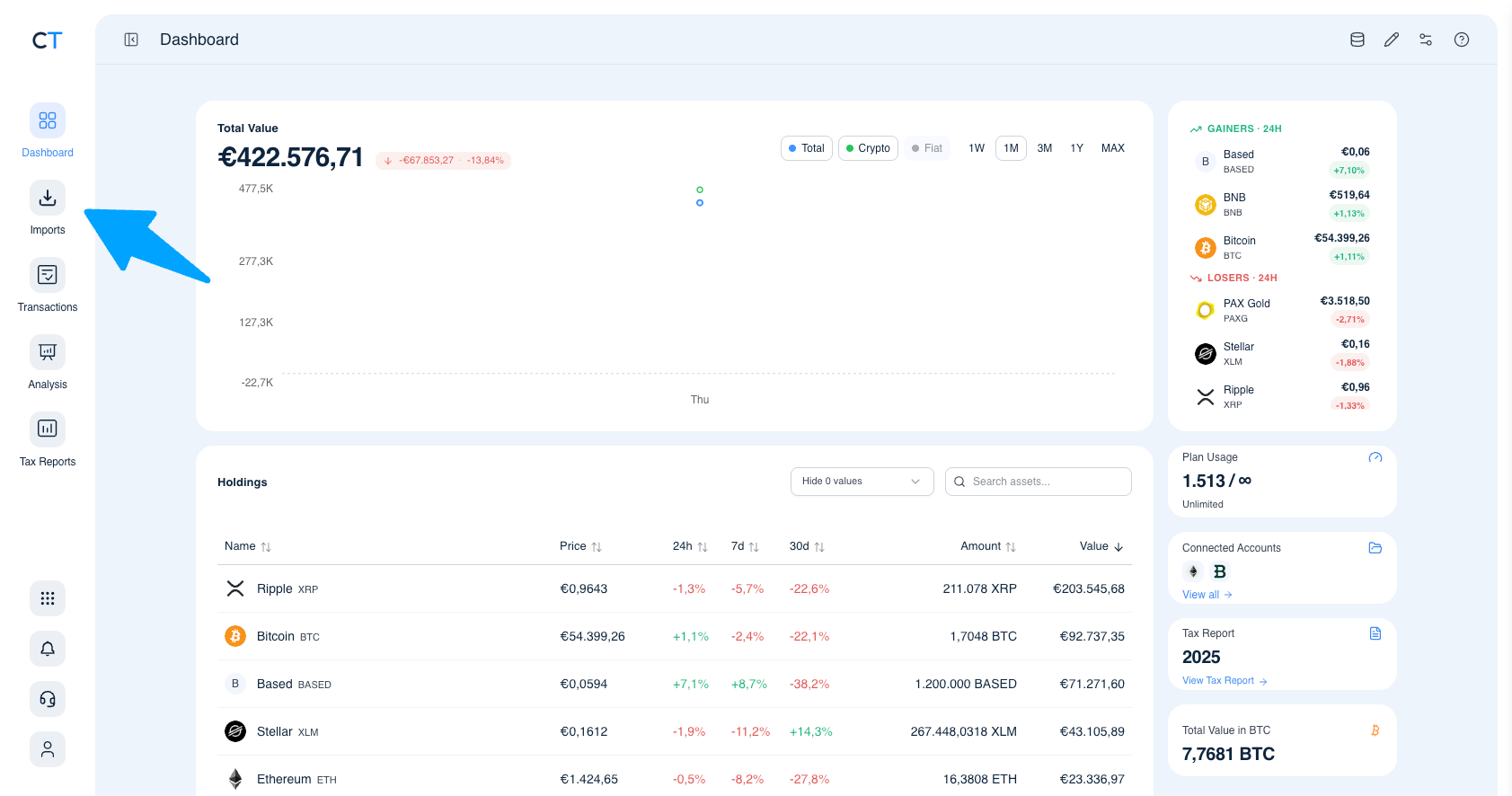
Log into CoinTracking and open Imports
After logging in, click the Import icon in the left navigation. This is where you connect all your exchanges, wallets and payment processors.
- 2
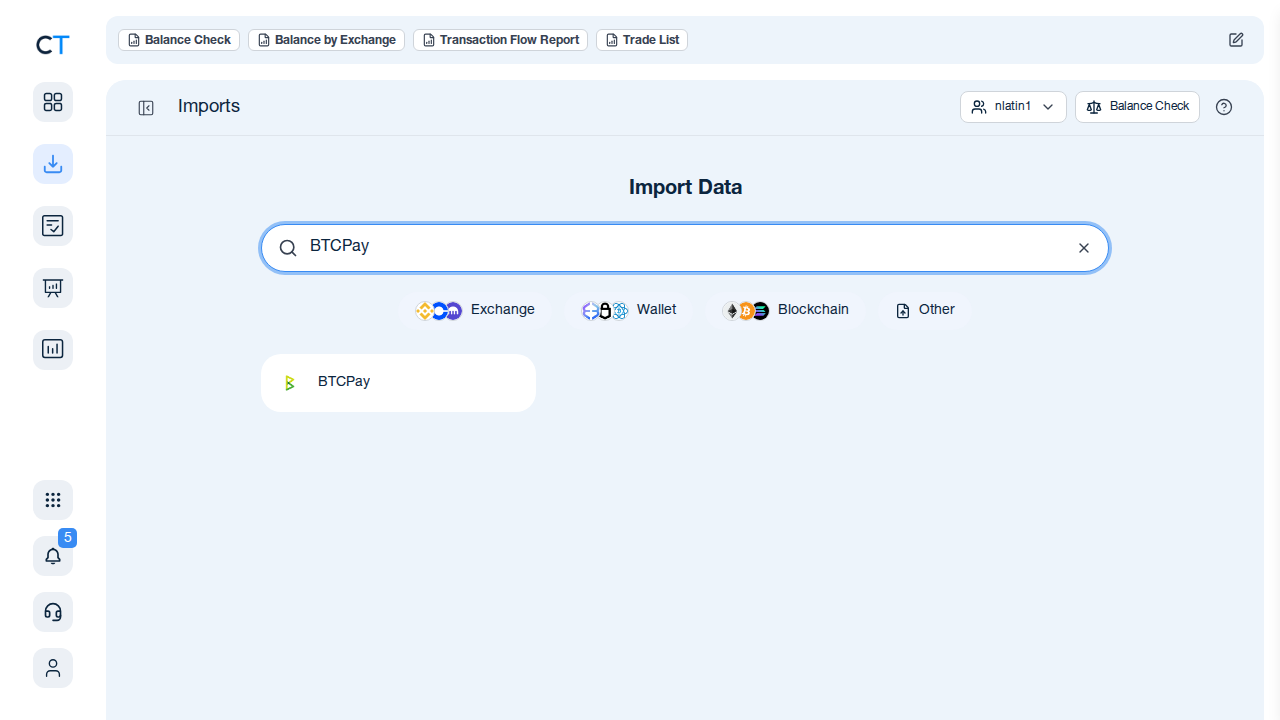
Search for BTCPay in the import list
Type "BTCPay" in the search field. CoinTracking will display the BTCPay import option ready to use.
- 3
Upload your BTCPay invoice CSV
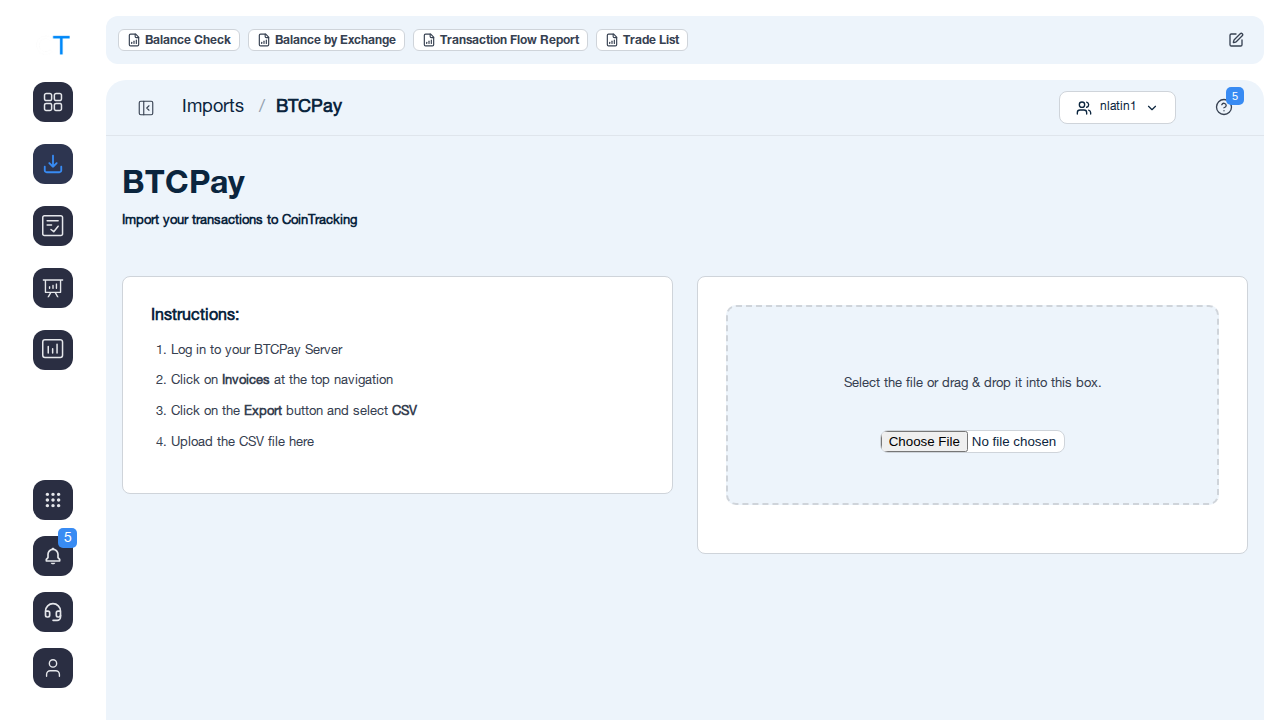
In your BTCPay Server, go to Invoices, click the Export button and select CSV. Download the file and upload it to CoinTracking.
"CoinTracking can handle just about any complex transaction you can throw at it and the automation is a real lifesaver. Of all the tax software tools we've reviewed, CoinTracking is the most detail-oriented and has more accuracy checks in place than the competition."

How to Create Your BTCPay Server
Tax Report with CoinTracking
Three steps from BTCPay invoice export to a tax report your accountant will accept.

Export your BTCPay invoice history
Log into your BTCPay Server, navigate to Invoices, click the Export button, select CSV and download the file with your complete invoice history.

Review your transactions
Open Reports → Validate Transactions. CoinTracking flags missing cost basis entries, duplicate imports and price gaps so your final report is accurate.

Generate and export your tax report
Select your country and tax year. CoinTracking generates a report formatted for your jurisdiction: PDF or Excel, ready to file or hand to your accountant.





Yes. When your business or self-employed activity accepts Bitcoin via BTCPay Server, the fair market value of each payment at the time of receipt is treated as taxable income in most jurisdictions. CoinTracking imports your BTCPay CSV and helps you calculate the income amount and any subsequent capital gains when you later convert or spend the Bitcoin.
Log in to your BTCPay Server instance, click on Invoices in the top navigation, then click the Export button and select CSV. This downloads a file containing all your invoice transactions. Upload that file into CoinTracking to import your full BTCPay history.
No. DAC8 is an EU directive that requires centralised crypto asset service providers (CASPs) to report user transactions to tax authorities. BTCPay Server is open-source software that you self-host — there is no central company holding your data. This means there is no automatic reporting to tax authorities via BTCPay. However, you are still personally responsible for declaring your Bitcoin income and gains correctly.
Yes, and the split matters. When you receive a Bitcoin payment, the value at that moment is business income (or employment income for sole traders). If you then hold the Bitcoin and its value changes before you sell it, the difference is a capital gain or loss. CoinTracking tracks both layers: it records the income at receipt and calculates any capital gain or loss on later disposal.
Sales tax and VAT obligations depend on the goods or services you sell, not on the payment method. Accepting Bitcoin via BTCPay does not exempt you from charging VAT if your business is VAT-registered. CoinTracking focuses on tracking income and capital gains from your Bitcoin holdings; for VAT compliance on your sales, consult a qualified tax advisor.
Yes. You can export CSVs from each of your BTCPay Server stores separately and upload them all to CoinTracking. CoinTracking consolidates all transactions across imports and calculates your total Bitcoin income, gains and losses for the tax year.
Start Tracking Your Crypto Taxes Today
Experience why 2.2 million users trust CoinTracking — sign up today for a seven-day free trial!